


Headless CMS: What It Is, How It Works, and Its Benefits
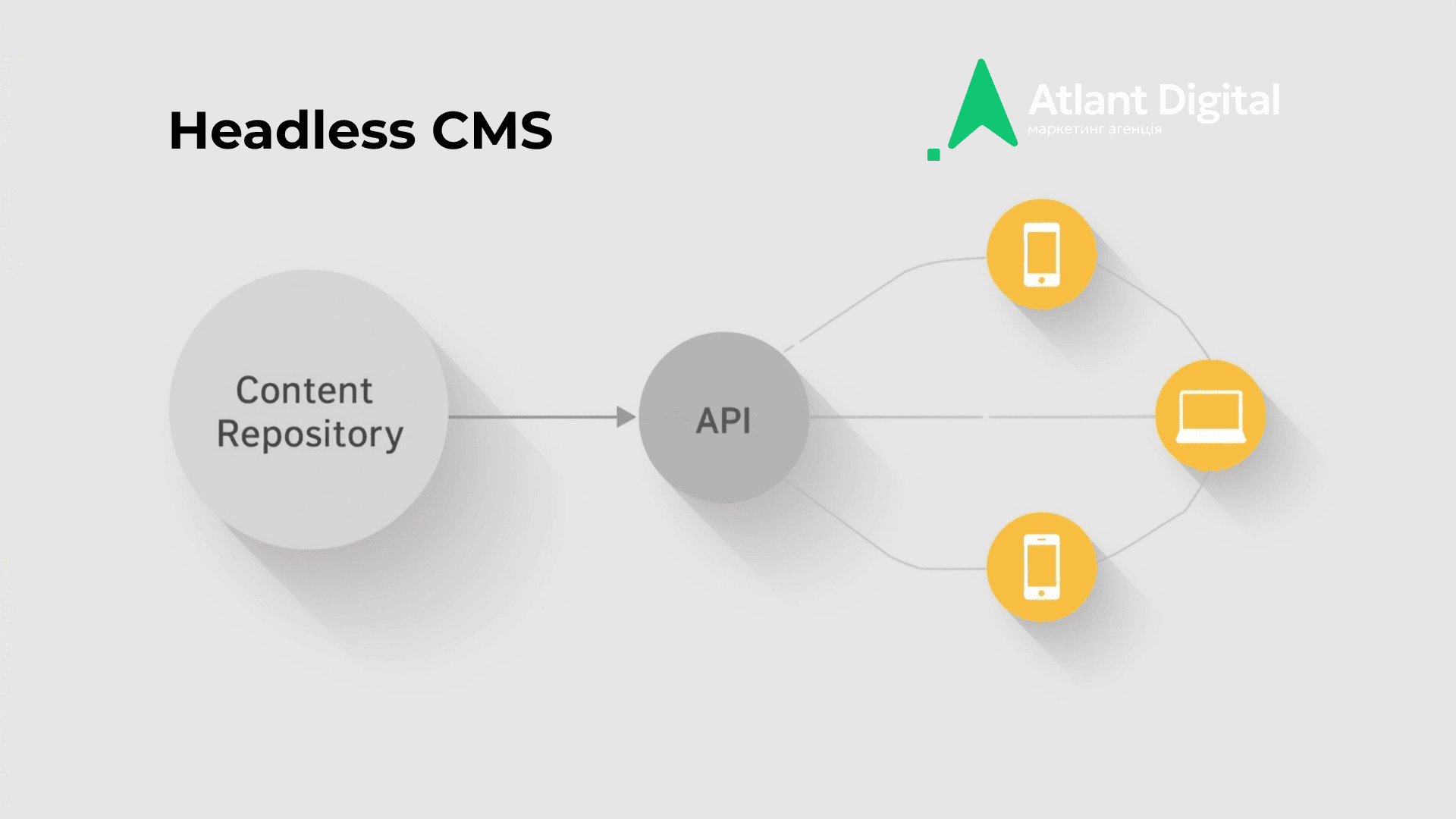
In simple terms, a headless CMS is a content management system where the “head” (the presentation layer—site templates/storefront) is separated from the “body” (content and its structure). The CMS stores content and exposes it via an API, while a separate frontend application decides how that content is displayed on a website, a mobile app, or any other interface.
In other words, what is a headless CMS: content as data + API, instead of “content + theme in one box.” This is especially useful when you have more than one digital “storefront”: landing pages, a blog, an online store, a mobile app, email templates, or even office screens—and you want to manage everything from a single source.
How a Headless CMS Works
A headless system typically has three core components: a content repository, an API, and frontend applications.
- Content repository. Content is stored not as “pages tied to templates,” but as structured entities: articles, products, categories, banners, FAQs, reviews, authors, promotions. You define fields (title, description, images, links, tags, language, publish date) and relationships between entities. Think of it like a data builder: model first, content second.
- API (REST/GraphQL). Content is delivered through an API. The frontend requests exactly what it needs—for example, “10 blog posts in Ukrainian, sorted by date,” or “product page + price + stock + related products.” This makes content reusable: the same “shipping description” can be displayed on the website, in the app, and in emails without copy-pasting.
- Frontend applications. This is your website or app built on a modern stack. The key advantage is that the frontend can be changed and updated independently from the content layer. Marketing edits content while development evolves the storefront—making headless CMS ideal for fast-growing projects.
Technology Stack for a Headless CMS
Headless CMS platforms are commonly paired with JAMstack/modern stacks where the frontend is separate and fetches content via API.
- Next.js. A frequent choice for business websites and eCommerce because it supports SSR/SSG/ISR, enables fast pages, and works well with SEO. Catalogs often use a hybrid approach: some pages static, some server-rendered, some client-driven.
- Gatsby. Great for content-driven projects, landing pages, and documentation where speed and static generation matter. Pros: rich plugin ecosystem. Cons: can be harder to maintain with highly dynamic data.
Can a Headless CMS Support Localization?
Yes — and it’s one of its strongest advantages. Most systems support multilingual setups either at the field level (same fields in multiple languages), the entity level (separate entry per language), or via i18n plugins. The key is agreeing upfront on how to manage URLs, hreflang, category translations, and responsibility for consistency. This prevents localization from turning into chaos: “the text is translated, but metadata and links were forgotten.”
Headless CMS Pros and Cons Table
| Parameter | Advantages | Disadvantages |
| Development speed | Frontend and content evolve independently; redesigns are easier | You must build the storefront separately—no “out-of-the-box” website |
| Omnichannel delivery | One content source for website, app, email, marketplaces | Requires disciplined data modeling and publishing processes |
| Integrations | Easier to connect CRM, PIM, search, personalization, A/B testing | Integrations must be designed: events, permissions, versions, security |
| Performance | Easy to build a fast frontend with CDN and caching | Poor architecture or inefficient API queries can hurt performance |
| Content governance | Structured content, roles, reviews, drafts, workflows | In some systems, the editor UI feels less familiar than in traditional CMS |
| SEO | Modern stacks can achieve excellent Core Web Vitals | SEO depends on the frontend: rendering, metadata, pagination, and hreflang must be implemented correctly |
What Headless CMS Is Used For
Headless architecture usually appears where content is a product asset, not just “pages on a website.”
- E-commerce. Headless commerce enables independent storefront development: fast catalogs, smart search, filters, personalized blocks—while the backend (pricing, inventory, orders) can be separate. This helps businesses improve UX and conversion without rewriting the entire system.
- Personalization. Content-as-data is easier to personalize: different segments can see different banners, collections, articles, and offers. Personalization systems can “stitch” data together more effectively when it’s structured.
- In-app content delivery. For SaaS and service products, a headless CMS often becomes a single source of truth: help center, knowledge base, release notes, onboarding, in-product tooltips. Product teams can update content without shipping a new app release.
- Collaborative content workflows. When multiple roles work on content (marketer, editor, legal, brand manager), you need statuses, reviews, permissions, and version history. Headless CMS platforms usually handle this better than template-based sites where everything is locked inside one admin panel.
Why Businesses Choose a Headless CMS
Headless is chosen not “because it’s trendy,” but for clear business outcomes.
- Better user experience. The frontend can be optimized for speed, mobile UX, and conversion. Modern-stack projects often deliver smoother navigation, less unnecessary code, and stronger Core Web Vitals—when the architecture is done correctly.
- More effective integrations. Businesses rarely live only inside a CMS. They need CRM, email, analytics, call tracking, CDP, payments, search, reviews, and chatbots. With headless, it’s easier to connect content to these tools via APIs and events—reducing manual work and speeding up new workflows.
- A scalable, adaptable foundation. Today you have a website and blog; tomorrow you need an app; next you expand to a new market or launch a second brand. When content is decoupled from the storefront, scaling is faster: you can add new channels without breaking existing ones.
Headless CMS vs. Traditional CMS: What’s the Difference
A traditional CMS typically combines content storage, an admin interface, and frontend templates in one product. This is convenient at the beginning: install it, choose a theme, build pages. But as the project grows, limitations appear: redesigning becomes risky, reusing content across channels is difficult, and integrations turn into “workarounds.”
The headless approach separates responsibilities: the CMS manages content and its structure, while the frontend delivers the user experience. The trade-off for flexibility is the need for development and a higher entry threshold. The payoff is faster change, scalability, and better control.
Types of Headless CMS
Atlant Digital selected popular solutions most commonly used in real projects (the best choice depends on budget, team skills, and integration requirements).
Sanity
Sanity is a flexible headless CMS often chosen by teams that need customization around their own content processes rather than an “out-of-the-box” experience. Content is defined through schemas (data structure), and the editor can be tailored for marketing and editorial teams: custom fields, hints, validations, templates, statuses, and page previews. This makes Sanity a strong fit for complex content: many entity types, relationships, and multiple roles.
Sanity’s strengths include real-time collaboration and treating content as data: when content changes, the interface can update instantly, and integrations are easier for developers to build. Another advantage is powerful querying (Sanity has its own query language), which helps assemble frontend blocks efficiently without excessive logic.
Best for: media, frequently updated brands, product sites, eCommerce with flexible blocks, teams with strong developers.
Watch out for: setup complexity (it’s a “builder”), the need for well-designed data models and publishing workflows.
Contentful
Contentful is one of the most well-known enterprise-level headless CMS options. It’s valued for structured content modeling, access control, role management, stability, and a broad integration ecosystem. If you have lots of content and multiple teams (marketing, editorial, local offices), Contentful often helps bring order: who edits what, how approvals work, and what gets published when.
Practical benefits include strong content modeling tools, scalability, and solid documentation. For international projects, workflows matter—drafts, planning, approvals, versioning—and Contentful typically fits these needs well. The most common downside is cost: as content volumes, locales, and user counts grow, pricing can increase significantly.
Best for: corporate sites, large organizations, SaaS, multi-region brands, projects with strict process and governance requirements.
Watch out for: budget, plan limits, reliance on cloud infrastructure, and multilingual setup rules.
Bloomreach
Bloomreach is closer to an eCommerce and personalization platform than “just a CMS.” It’s often chosen by large retailers and chains that want to combine content, search, recommendations, and personalized journeys into one system. Bloomreach typically follows a “content + commerce + user experience” logic: not just placing a banner, but showing it to the right segment and driving a purchase.
Its strengths are omnichannel delivery and personalization scenarios: different storefronts, different audiences, different offers. Where a standard CMS stops at “pages,” Bloomreach continues with “user journeys”: curated collections, recommendations, segmented content, and deep integration with product and customer data.
Best for: mid-to-large eCommerce, marketplaces, personalized retail networks, projects where search and recommendations matter.
Watch out for: implementation complexity, the need for mature analytics/data (without it personalization won’t deliver), and cost.
Storyblok
Storyblok is a popular middle ground for teams where marketing needs to “see the page,” but the business wants headless architecture. It’s a headless CMS with a visual editor: editors can modify blocks and immediately preview how they look, while the frontend remains a separate application consuming content via API.
Storyblok’s strength is its component-based approach: you build a library of blocks (hero, benefits, reviews, FAQ, cards), and the content team assembles pages without breaking design. This speeds up landing page launches and hypothesis testing, reduces developer workload, and helps maintain consistency.
Best for: marketing sites, landing pages, corporate websites, teams with frequent changes and A/B hypotheses.
Watch out for: the quality of your component library—if blocks are poorly designed, the visual editor won’t save you.
Hygraph
Hygraph (formerly GraphCMS) is a headless CMS with a strong GraphQL-first focus. This is useful when teams have multiple data sources and complex queries: content, catalogs, filters, relationships like “product → category → collection → article.” GraphQL lets the frontend request exactly what it needs—no more, no less—which is great for speed and architecture.
Hygraph is often chosen by product teams aiming to build a “unified data layer”: not only storing content but connecting it to external systems. Combined with a modern stack (Next.js, etc.), it creates a clean model: strongly typed data, fewer hacks, easier maintenance.
Best for: SaaS, complex catalogs, content with many relationships, teams experienced with GraphQL.
Watch out for: editor and developer learning curve (schema design skills required) and strong discipline in data modeling.
Strapi
Strapi is an open-source headless CMS that can be deployed on your own server or in the cloud with full control over code, data, roles, and extensions. It’s often selected when businesses want to avoid SaaS dependency or need custom features: custom fields, integrations, publishing logic, and fine-grained permissions.
The main advantage is flexibility and control: you can customize the admin, build plugins, and integrate authentication to meet enterprise requirements. This is especially valuable when security and infrastructure are critical. The downside is responsibility: you take on part of the maintenance, updates, and stability.
Best for: self-hosted requirements, custom products, developer-led startups, companies with internal services.
Watch out for: resources for maintenance, updates, security, and DevOps quality.
Agility CMS
Agility CMS is a commercial solution focused on enterprise workflows: structured processes, governance, roles, and integrations. It’s often chosen when content teams must follow strict rules: approvals, scheduled publishing, access rights, and version management.
Unlike many purely developer-friendly platforms, Agility aims to be business-friendly as well: less chaos, more control. That’s valuable for organizations with many stakeholders and quality requirements: standards, audit trails, and publication control.
Best for: corporate websites, large content teams, brands with strict regulations and complex organizational structures.
Watch out for: cost, integration fit with your stack, and whether the editor matches your real workflows.
Ghost
Ghost is historically strong as a blogging and media CMS, but it can also be used in a headless way: content lives in Ghost, while a separate frontend consumes it via API. It’s loved for a clean editor, fast setup, and a publishing-first focus: writing, newsletters, subscriptions, basic roles, and a clear UI.
From a headless architecture perspective, Ghost is often used when you need to launch a content layer (e.g., a blog) quickly and connect it to a main site built with Next.js. So Ghost is not a universal CMS for everything—it’s a strong tool for content hubs, media sections, and subscription-based models.
Best for: blogs, media, expert content projects, content marketing, simplified knowledge base sections.
Watch out for: limited data model customization (vs. Sanity/Contentful) and constraints for complex eCommerce use cases.
How to Choose a Headless CMS
Start not with a CMS brand, but with project questions:
- How many content channels do you have now—and will you have in a year? If it’s just one simple website, headless might be excessive.
- Who updates content and how often? If marketing edits content daily, you’ll need a user-friendly editor, permissions, drafts, and review workflows.
- Do you need multilingual support, and how do you handle SEO across languages? Plan URL structure, hreflang, and taxonomy translations.
- What integrations are mandatory? CRM, PIM, search, analytics, payments—make a list and evaluate how they connect.
- Is your team ready for a modern stack? You’ll need frontend developers, DevOps/hosting, and structured release processes.
- What level of control and security is required? Some industries demand audit logs, strict access control, and secure data storage.
Practical tip: run a short pilot. For example, migrate one section—like a blog or knowledge base—to headless and see how your team handles data models, editing, publishing, and releases.
Final Thoughts
Headless is a powerful architecture—but not a universal solution. It delivers more flexibility and speed over time, provided you have the right team and a clear understanding of why you need that flexibility.
When Headless CMS Might Not Be the Right Fit
Headless may not be suitable if:
- you need a very simple “launch and forget” template-based website with no development;
- you lack a team to maintain the frontend and integrations;
- content changes rarely and there’s no need for omnichannel delivery;
- the budget is limited and speed-to-launch is more important than architectural flexibility.
Headless CMS Risks
The main risks usually lie not in the CMS itself, but in expectations and processes:
- underestimating the cost of storefront development and maintenance;
- weak data modeling, making life difficult for editors and complicating the frontend;
- SEO implementation mistakes on the frontend (rendering, metadata, pagination, hreflang);
- complex integrations and reliance on proper tracking/events;
- a “zoo” of disconnected services with no single process owner.
The best approach is to choose headless not “because it’s trendy,” but because you clearly understand which problems it solves: faster page launches, multi-channel content delivery, easier integrations, and better control.
Useful Links
If you want to compare solutions and explore the market, start with these directories and rankings: