



Зміст статті
- What Schema Markup Actually Does
- Types of Schema Markup
- Syntax Formats and Their Vocabulary Pairings
- JSON-LD
- RDFa
- What Makes Open Graph Markup Interesting?
- Schema.org Markup
- Google's Official Validators
- How to Check Markup in Search Engines?
- What Schema Markup Does Different Site Types Need?
- Google's Penalties for Incorrect Schema Markup
- Schema Markup: Do It or Not?
Schema markup is a set of special tags in a page’s code that help search engines understand what’s on it. Regular HTML shows how content looks. Schema markup explains what it means. For example, the text “09:00–18:00” without markup is just a string of characters. With markup, it becomes the working hours of a specific organization — which Google can show directly in the snippet.
In essence, it’s a way to “talk” to search engines in their language — structured data. The search engine gets a clear signal: here’s a product, here’s the price, here’s a review, here’s an address. And it’s on the basis of these signals that rich results are formed — snippets with stars, prices, FAQ blocks, and breadcrumb trails that noticeably increase click-through rates.
What Schema Markup Actually Does
The main effect of schema markup is that search engines start to better understand what’s on a page. This affects how a site looks in search results and how many clicks it gets.
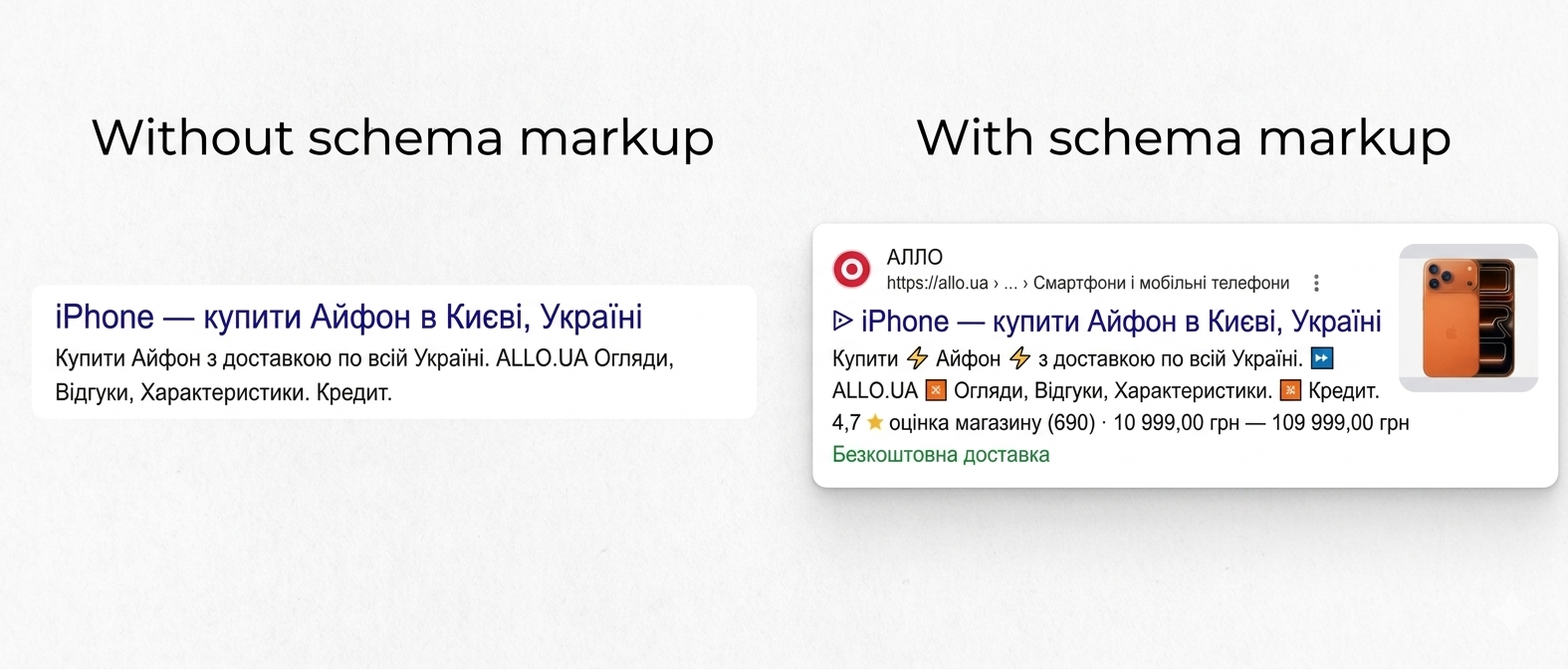
A few concrete examples of what markup delivers:
- Rich snippets. A snippet is the block with a title, link, and page description you see in search results. Without markup, it looks like plain text. With markup — it can show a product price, a star rating, a photo, business hours, or a review count. All visible before the user even visits the site.
- Higher CTR. A snippet with a price and rating immediately attracts more attention than plain text. That’s why even sites ranked lower often collect more clicks than competitors ranked higher — but without markup.
- Inclusion in special blocks. Google sometimes displays an answer directly above search results — without requiring a visit to the site. Or it assembles separate blocks for recipes, events, and courses. All of this is made possible by markup.
- Voice search. When a user asks an assistant for “company X’s phone number” — the assistant pulls the answer from structured data on the contact page.
Important to understand: schema markup doesn’t directly push a site higher in organic results. But it makes the site more visible in search — and that impacts traffic and behavioral signals.
Types of Schema Markup
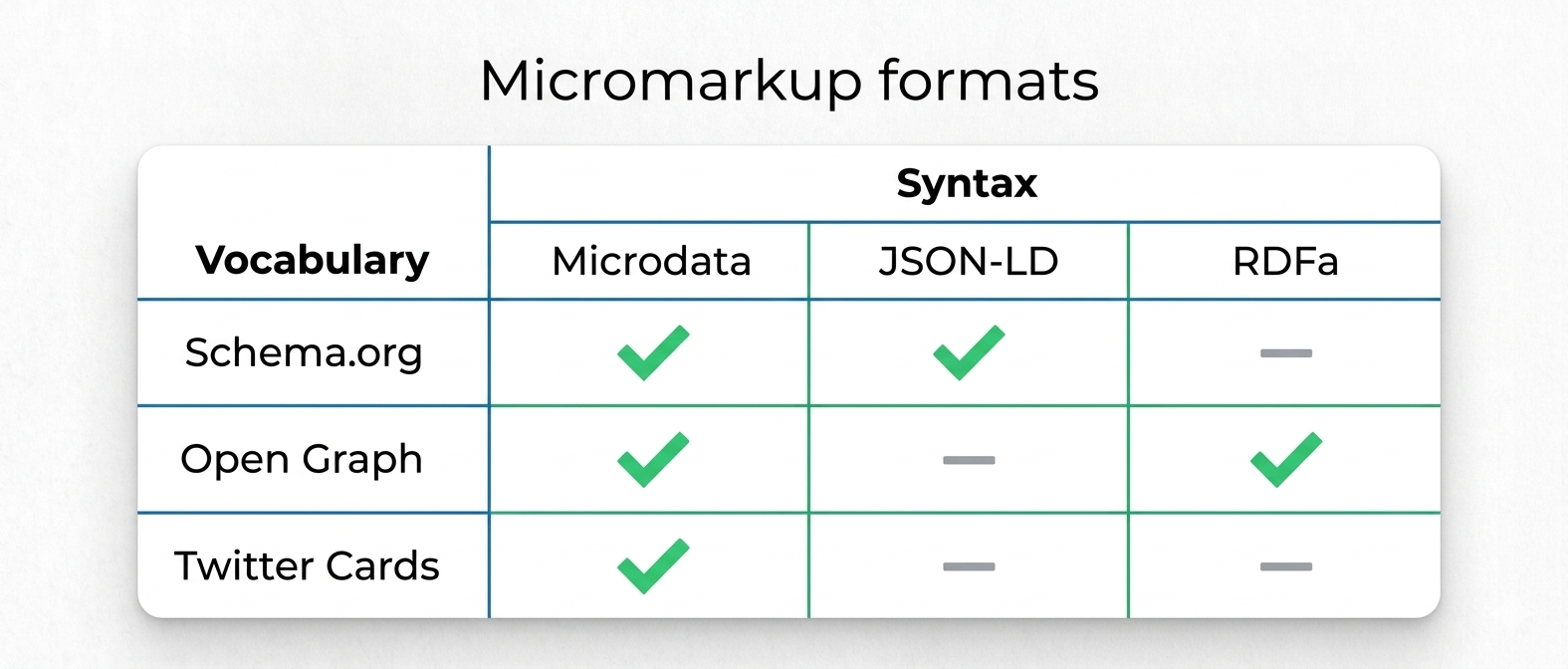
All markup variants can be divided along two lines: how it’s written in code (syntax) and what terms it uses to describe data (vocabulary).
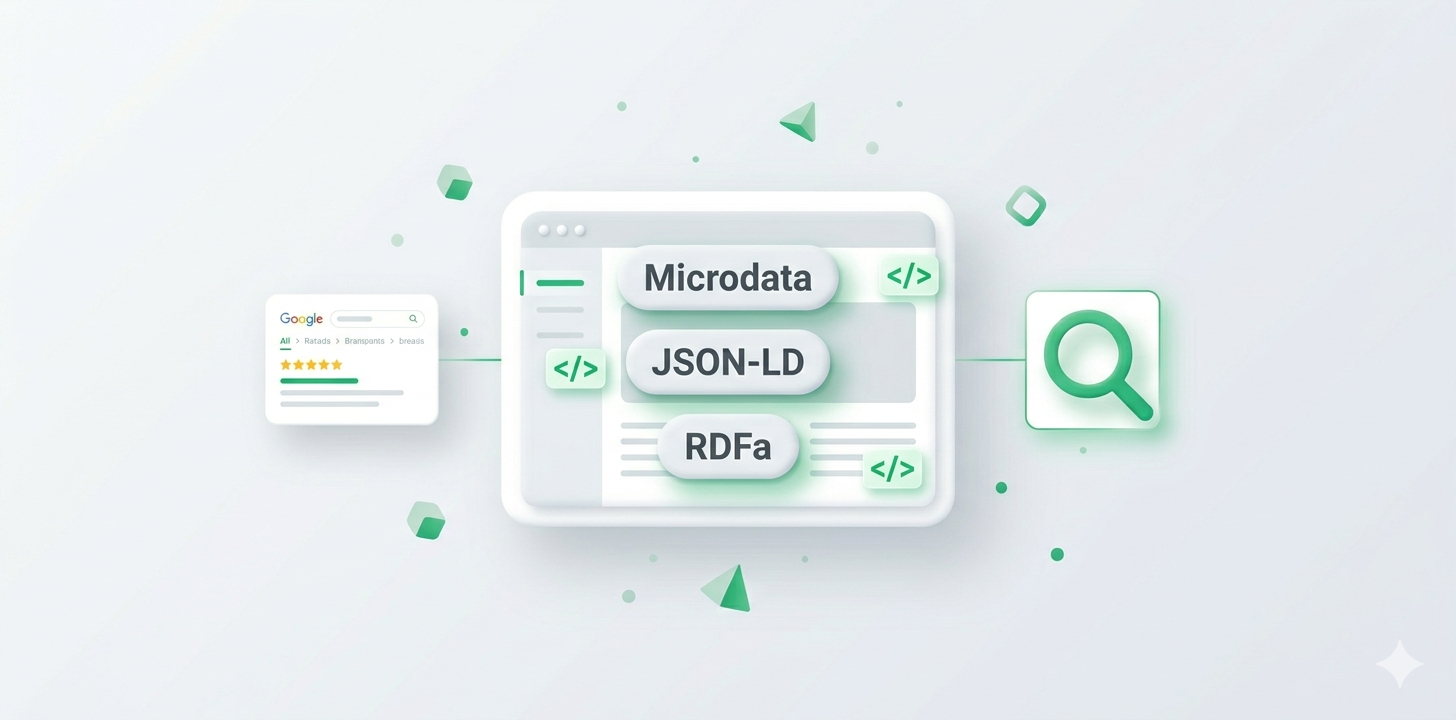
There are three syntax formats: Microdata, JSON-LD, and RDFa. Each embeds into page code differently — detailed breakdown below.
The most common vocabularies are Schema.org, Open Graph, and Twitter Cards. Schema.org is the primary standard for working with search engines. Open Graph and Twitter Cards are oriented toward social networks: they control how a page looks when shared on Facebook, Instagram, or Telegram.
For most sites, the optimal choice is JSON-LD with the Schema.org vocabulary. That’s the format Google recommends.
Syntax Formats and Their Vocabulary Pairings
Schema markup can be implemented in three different ways. They differ in how data is written into the page’s code — but all three are understood by search engines.
Microdata
Microdata is a format that embeds directly into HTML tags via special attributes. It looks like this: standard tags get itemscope, itemtype, and itemprop attributes that describe the entity and its properties.
Example — organization markup:
<div itemscope itemtype="https://schema.org/Organization">
  <span itemprop="name">Atlant Digital</span>
  <span itemprop="telephone">+380 XX XXX XX XX</span>
</div>
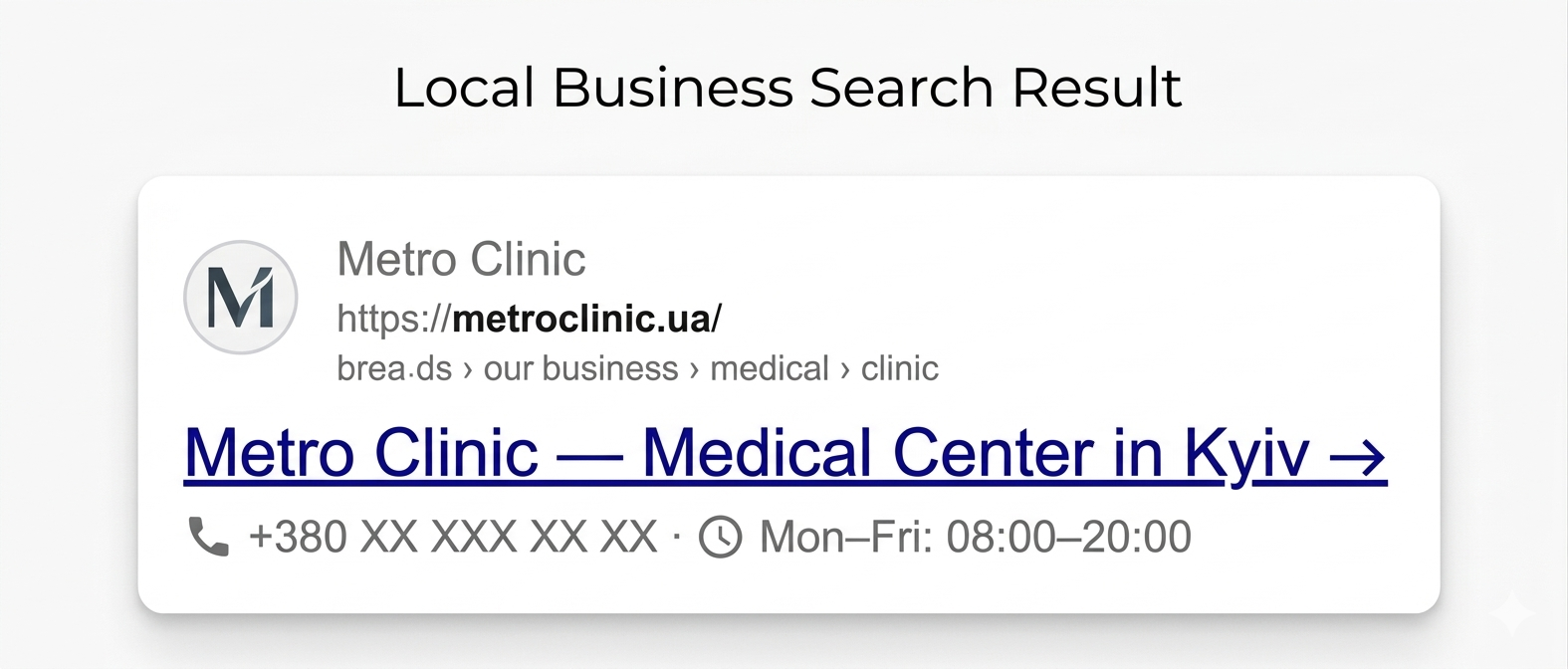
What the user sees in Google: If someone searches for a clinic’s contact info in Kyiv — the search engine may show the phone number directly in the snippet, without visiting the site.
The main downside is that the markup is tightly bound to the HTML structure. If the layout is complex or changes frequently, maintaining such code is inconvenient. That’s why this format is gradually being replaced by JSON-LD.
JSON-LD
JSON-LD is Google’s recommended format. Unlike Microdata, it doesn’t embed into HTML tags — it’s placed as a separate <script> в block in the head or body of the document. This means markup can be added or changed without any changes to the layout.
Example — blog article markup:
<script type="application/ld+json">
{
  "@context": "https://schema.org",
  "@type": "Article",
  "headline": "What Is Schema Markup",
  "author": {
    "@type": "Organization",
    "name": "Atlant Digital"
  },
  "datePublished": "2025-01-01"
}
</script>
What the user sees: The article snippet may show a publication date and author name — right in the search results, without visiting the site. For news and blog sites, this builds trust in the content.

JSON-LD supports all Schema.org types, scales easily, and doesn’t break when layouts change. Most SEO plugins for WordPress and Shopify generate markup in this format.
RDFa
Another way to add semantics directly into HTML tags, but it’s based on a different specification and supports a wider set of vocabularies.
In practice, RDFa is rarely used for SEO purposes. It’s more common in the public sector, academic institutions, and medical resources — where compatibility with specific library standards matters. For a regular commercial site, JSON-LD is sufficient.
Quick comparison of the three formats:
- JSON-LD — recommended choice for most sites. Simple, layout-independent, supported by all search engines.
- Microdata — suitable for legacy projects where adding JSON-LD is technically difficult.
- RDFa — for specific projects with complex vocabulary requirements. Overkill for standard commercial sites.
What Makes Open Graph Markup Interesting?
Open Graph is a protocol from Meta that controls how a page looks when shared on social networks. It doesn’t affect Google rankings, but it’s critical for how posts appear on Facebook, Instagram, LinkedIn, and Telegram.
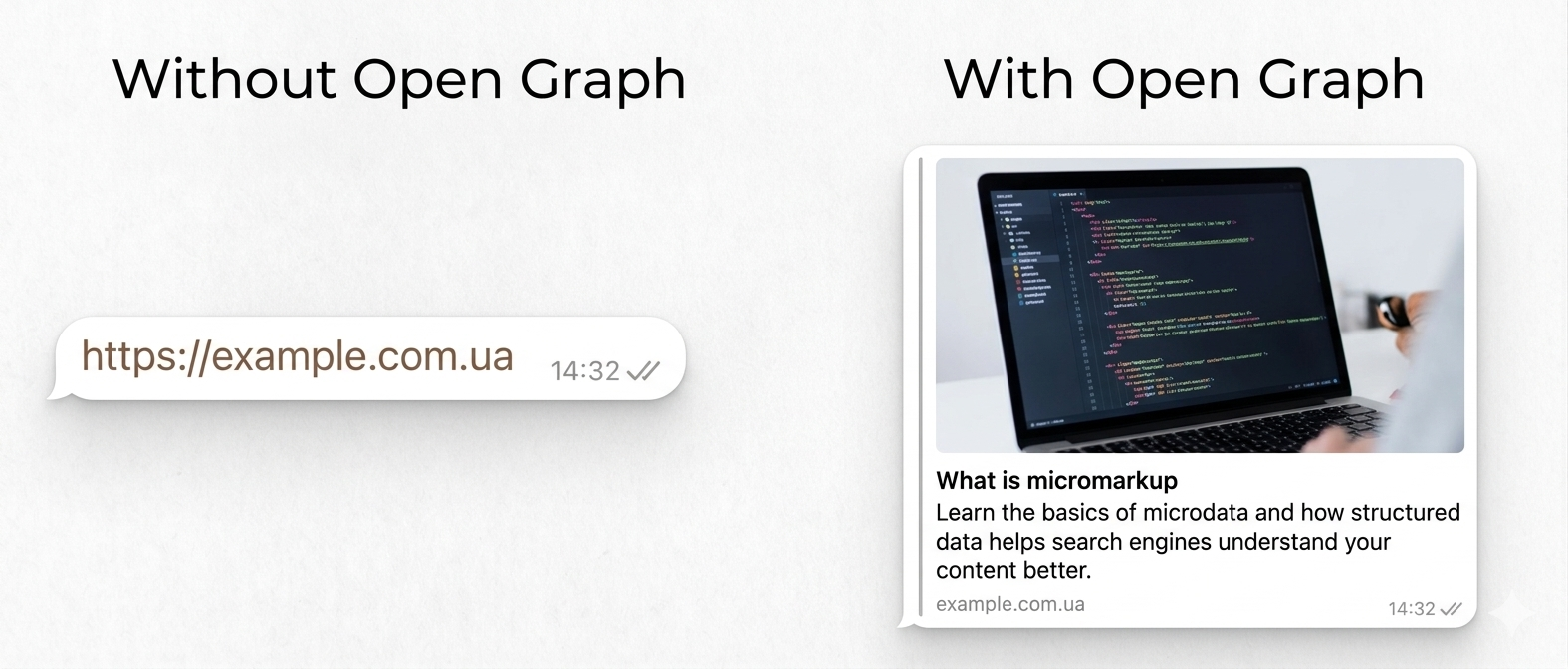
Without Open Graph, the social network decides what to show in the link preview — and often gets it wrong: it pulls a random image, cuts the headline, or shows the wrong description. With properly configured tags, the preview looks clean and appealing.
Two core tags that handle most use cases:
<meta property="og:title" content="What Is Schema Markup" />
<meta property="og:image" content="https://example.com/og-image.jpg" />
og:title — the headline shown when sharing. og:image — the preview image. There’s also og:description (short description), og:url (page link), and og:type (content type: article, video, etc.) — all added to the <head> section of the HTML document.
What the user sees: When someone shares a link on Telegram or Facebook — instead of a bare URL, a card appears with the headline, description, and cover image you specified.
Twitter/X has its own equivalent — Twitter Cards. But if Open Graph is already configured, Twitter automatically picks up most of the data from it.
Open Graph doesn’t replace Schema.org markup — they’re parallel tools for different channels. A complete strategy involves implementing both.
Schema.org Markup
Schema.org is a joint project by Google, Bing, and Yahoo, launched in 2011. It’s a unified vocabulary of types and properties for describing any entity on the web: organizations, products, articles, recipes, events, people, places, and more. The de facto standard for SEO markup.
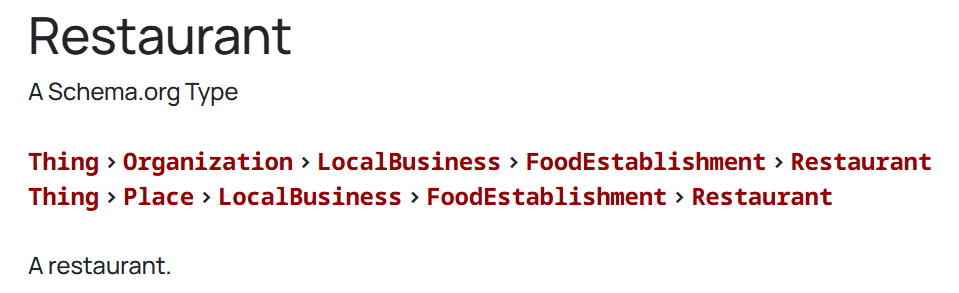
The vocabulary is hierarchical: each type inherits properties from its parent. For example, LocalBusiness is a subtype of Organization. That means LocalBusiness has access to all Organization properties plus its own. The more specific the type — the better the result.
A few practical rules:
- Use the most specific type. If your business is a restaurant, use
Restaurant, not justOrganization. - Fill in all recommended fields. Google distinguishes between required and recommended properties. Recommended ones don’t block rich results, but they increase the chance of getting them.
- Don’t invent properties. All fields must come from the official Schema.org vocabulary — non-standard ones are simply ignored.
Examples of Rich Results Formed by Schema.org
Depending on the markup type, Google may display different rich results. Here are the most common ones.
Recipes
Recipe markup lets you display cooking time, calorie count, rating, and a photo of the dish directly in the snippet.
Minimum field set needed to get a rich snippet:
{
  "@context": "https://schema.org/",
  "@type": "Recipe",
  "name": "Borscht",
  "cookTime": "PT1H",
  "recipeYield": "6 servings",
  "aggregateRating": {
    "@type": "AggregateRating",
    "ratingValue": "4.8",
    "reviewCount": "120"
  }
}
The remaining fields —cookTime, recipeYield, aggregateRating — are optional, but the more you fill in, the richer the snippet in search results.
What the user sees: For a query like “borscht recipe,” the page may appear as a card with a photo and cooking time — before visiting the site.
Contacts
TheLocalBusiness type lets you pass address, phone number, business hours, and geocoordinates. This information may appear in the Knowledge Panel — the company information block on the right in Google.
What the user sees: When searching for a company’s name — a separate block with address, phone, business hours, and a Google Maps link. Without visiting the site.
Some Essential Page Elements
Beyond markup for specific content types — products, recipes, events — there are baseline elements worth adding to any site regardless of its topic.
WebPageorWebSite— general resource information: name, description, language, links. Helps Google correctly identify the site as a single entity.BreadcrumbList— page navigation trail. For example: Home → Catalog → Laptops. Displayed in the snippet instead of a long URL — looks cleaner and more user-friendly.OrganizationабоLocalBusiness— company data: name, logo, contacts, social media links. The foundation for forming a Knowledge Panel in Google.SiteLinksSearchBox— adds a site search bar directly in the snippet. Relevant for large stores and portals with many pages.
Courses
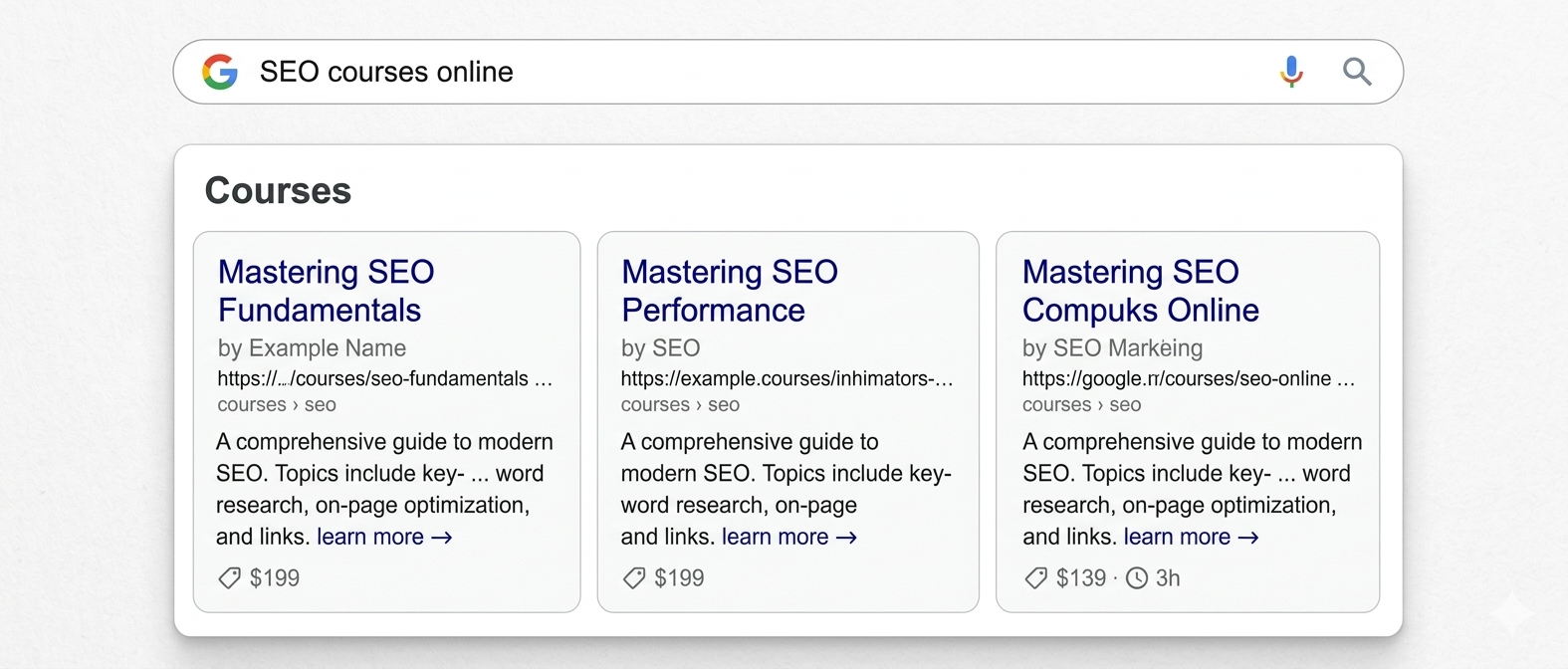
The Course type lets you pass a course name, provider, and description. Google may display this data in a separate block in search results — relevant for educational platforms and agencies that run training programs.
Minimum field set:
{
  "@context": "https://schema.org",
  "@type": "Course",
  "name": "SEO from Scratch to Results",
  "description": "A practical course for beginners...",
  "provider": {
    "@type": "Organization",
    "name": "Atlant Digital"
  }
}
If the course is paid — add offers with a price. If there are start dates — add startDate. The more detail, the higher the chance of appearing in a rich block.
What the user sees: For a query like “SEO courses online” — a card with the course name, provider, and short description right in the search results, without visiting the site.
Events
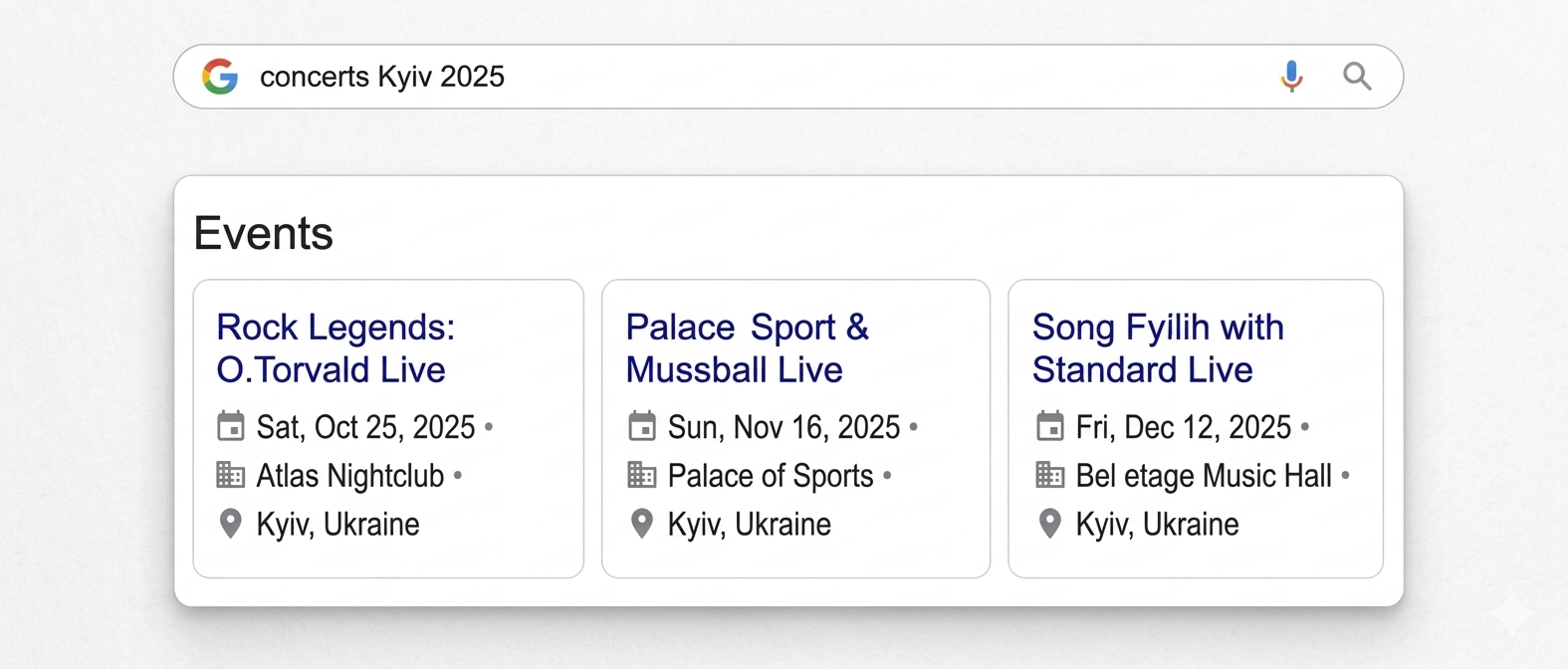
The Event type passes the event name, date, venue, and ticket link. Google displays such events in a dedicated block — particularly relevant for concerts, webinars, and conferences.
Minimum field set:
{
  "@context": "https://schema.org",
  "@type": "Event",
  "name": "SEO Conference Kyiv 2025",
  "startDate": "2025-09-15",
  "location": {
    "@type": "Place",
    "name": "Zhovtnevy Palace",
    "address": "Kyiv, Instytutska St, 1"
  }
}
Images
The ImageObject type lets you specify the author, license, and description of an image. This is important for appearing in Google Images and for images to display correctly in search results.
Minimum field set:
{
  "@context": "https://schema.org",
  "@type": "ImageObject",
  "contentUrl": "https://example.com/photo.jpg",
  "license": "https://creativecommons.org/licenses/by/4.0/",
  "creditText": "Atlant Digital",
  "creator": {
    "@type": "Organization",
    "name": "Atlant Digital"
  }
}
What the user sees: When searching for an image in Google Images — the photo shows the author and license information. Especially important for stock photo sites, media outlets, and any site with a lot of original content.
Product
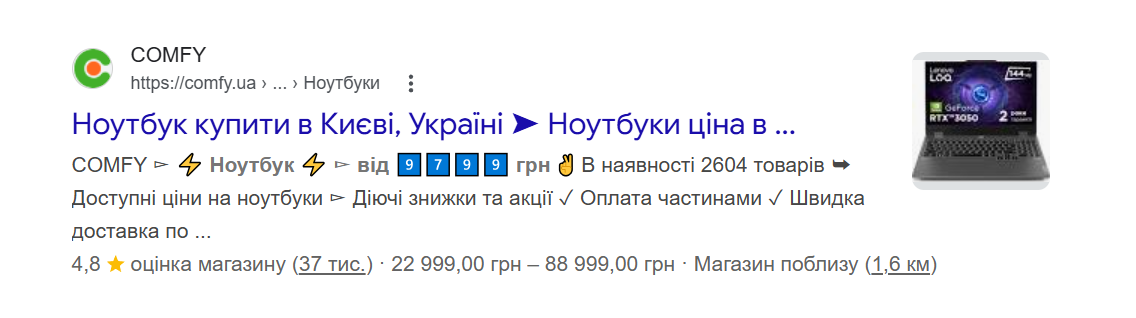
The Product type is one of the most important for online stores. It lets you pass a name, price, availability, and rating. Correct markup enables visibility in Google Shopping and price snippets directly in search results.
{
  "@type": "Product",
  "name": "Laptop XYZ",
  "offers": {
    "@type": "Offer",
    "price": "25000",
    "priceCurrency": "UAH",
    "availability": "https://schema.org/InStock"
  }
}
What the user sees: For a query with the product name — a snippet with the price and an “in stock” label right below the title.
Reviews and Ratings
The Review and AggregateRating types pass customer scores and reviews. These are what make stars appear in a snippet — one of the most effective ways to stand out in search results.
Minimum field set:
{
  "@context": "https://schema.org",
  "@type": "Product",
  "name": "Laptop XYZ",
  "aggregateRating": {
    "@type": "AggregateRating",
    "ratingValue": "4.8",
    "reviewCount": "328"
  }
}
Important nuance: Google won’t display a rating if the reviews were written by the company itself. Real user reviews are required — otherwise there’s a risk of receiving penalties.
What the user sees: Stars and a review count right under the snippet headline. For example: ⭐ 4.8 (328 reviews)
Google's Official Validators
Before publishing a page with schema markup, you need to verify its implementation. Google provides official tools for this.
- Google Rich Results Test (search.google.com/test/rich-results) — the primary validation tool. Enter a page URL or paste HTML code — it shows which rich results are available for the page and lists all errors and warnings.
- Schema Markup Validator (validator.schema.org) — checks the syntactic correctness of markup. Useful for verifying code before publishing, without waiting for indexing.
- Google Search Console — under “Rich Results” shows a site-wide picture: how many pages passed validation, how many have warnings, and how many are blocked due to errors.
How to Check Markup in Search Engines?
Validation is a mandatory step after any code changes. Errors in schema markup don’t just “have no effect” — they can lead to penalties from Google.
Checking Markup in Google
Two main methods:
- Google Rich Results Test. Open search.google.com/test/rich-results, enter the URL or paste HTML. The tool shows which rich result types are available and exactly where the errors are.
- Google Search Console. Under “Search Appearance” → “Rich Results” you’ll find a report covering all site pages. Statuses you’ll see:
- Valid — the page meets all requirements and is eligible for a rich result.
- Valid with warnings — markup is present but some recommended fields are missing.
- Error — critical issues blocking the rich result. Requires fixing.
After fixing errors, request re-indexing via “URL Inspection” in Search Console — this speeds up the markup status update.
What Schema Markup Does Different Site Types Need?
The markup set depends on the resource type and its goals. There’s no universal solution — there’s a logic: what exactly is the user searching for on your site, and what can Google show in search results.
Schema Markup for Online Stores
For e-commerce, schema markup is one of the key technical factors. It directly impacts what users see in search results before visiting the site: price, stock availability, rating, and photo. The more useful information in the snippet, the higher the likelihood of a click.
Breadcrumb Markup
Breadcrumbs are hints in the snippet showing where the page sits in the site structure. Instead of a long, unreadable URL, the user sees: Home → Catalog → Laptops. This immediately conveys which page they’ll land on — before clicking.
For online stores this is especially important: deep catalog pages have long URLs that look like a string of symbols in search results. The breadcrumb trail replaces that URL with a clear path and visually distinguishes the result from competitors.
Markup type — BreadcrumbList. Added to all catalog pages, product pages, and blog articles.
Social Media Markup
Beyond markup for search engines, each product page needs Open Graph tags — for social networks. This matters because people often share product links on Facebook, Instagram, or Telegram. If Open Graph isn’t configured — the social network decides what to show in the preview: it might pull a random photo, cut the name, or show an empty block.
With properly configured Open Graph, a product card preview looks like this: a large product photo, a clear name, and a short description. The user understands what the product is and what it costs before clicking — and is more likely to do so.
Product Page Markup
The product page is the store’s main commercial page. It has every chance of getting a rich snippet with a price and stars — but only if the markup is complete. Product type with required fields:
name— product nameimage— photo (at least one)offers— price, currency, availabilityaggregateRating— rating and review countbrand— manufacturersku— article number
Having all these fields significantly increases the chance of getting a snippet with price and stars directly in search results.
Company Information
The Organization type lets you pass Google basic business data: name, logo, contacts, and social media links. It’s exactly this data that Google uses to form the Knowledge Panel — the company info block that appears on the right in search results when someone searches for a brand name.
For an online store this matters for two reasons. First, the Knowledge Panel builds trust — the user sees the official logo, contacts, and social media right in Google. Second, it protects the brand: if the markup is in place, Google knows definitively which site is the official company representative.
Core fields:
name— company nameurl— official websitelogo— logocontactPoint— phone and emailsameAs— links to Facebook, Instagram, LinkedIn, etc.
Search Bar Markup
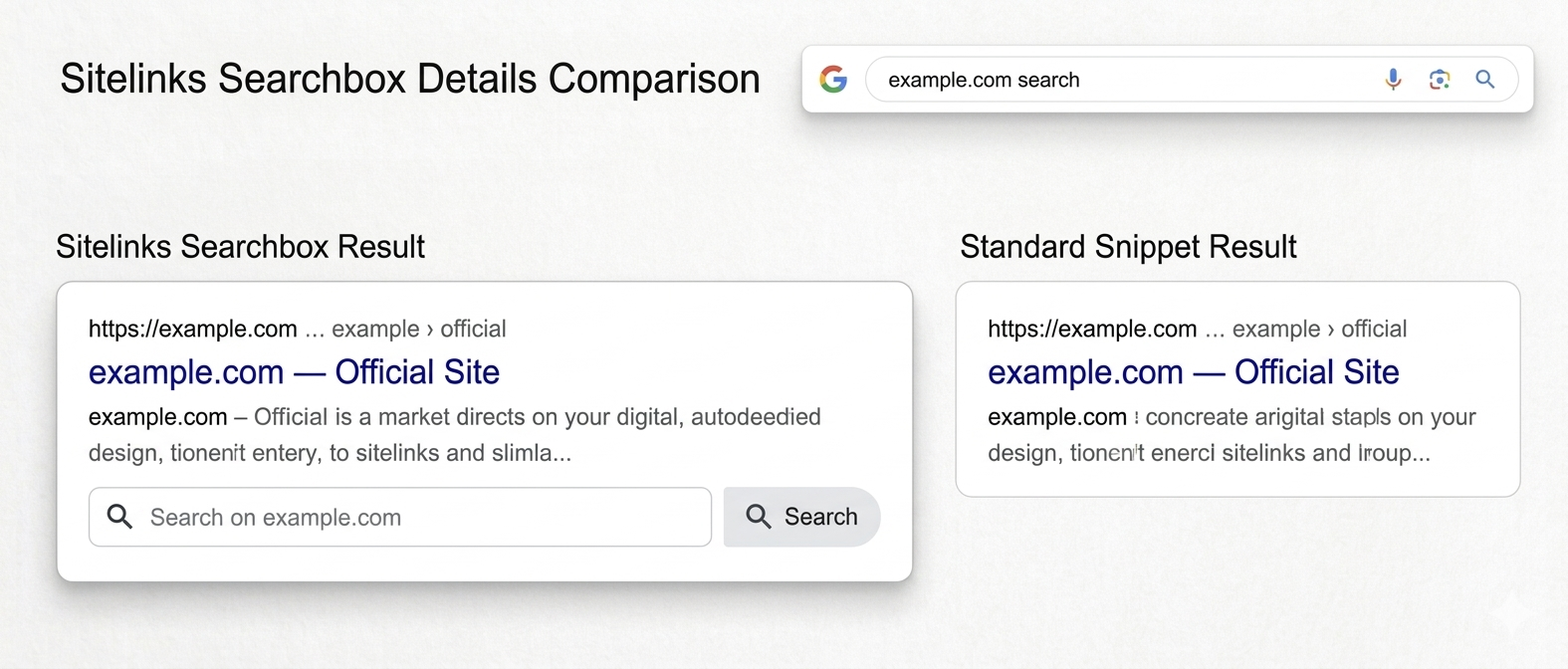
If the site has internal search — it can be surfaced directly in the Google snippet. The user sees a search bar below the site title in results and can enter a query without visiting the site.
Implemented via the WebSite type with a potentialAction property of type SearchAction. Relevant for large stores with thousands of products — when the user already knows what they’re looking for and wants to land directly on the right page.
What the user sees: When searching for the store name — a line appears below the main result: “Search on example.com.” Enter a query — and you land directly on the store’s internal search results page.
Schema Markup for Service Websites
A person searches for a dentist, a lawyer, or a repairman. They enter a query in Google and see several results. One immediately shows an address, phone number, and hours — they can call directly from the search results. Another shows just a name and text. Which one will they contact first? That’s exactly why service sites need schema markup.
Company Contacts
The LocalBusiness type with address, phone, geocoordinates, and business hours. Without this markup, a company has less chance of appearing in local search results and on Google Maps — which is critical for any business operating in a specific city or region.
Core fields:
name— company nameaddress— full addresstelephone— phone numberopeningHours— business hoursgeo— geocoordinates
What the user sees: When searching “dentist Kyiv” or a specific company name — address, phone, and hours right in search results or on Google Maps.
Blog / Articles
Article or BlogPosting markup for each piece of content. Even if a service site runs a blog — every article needs basic markup with headline, author, datePublished, image and publisher. fields. This increases the chance of showing a publication date and author name in the snippet — which adds credibility to the content.
Courses / Events
If the company runs training sessions or in-person events — Course or Event markup opens access to special blocks in search results. A person searches “SEO courses Kyiv” and immediately sees a card with a name, date, and price — without visiting the site. Full field details and code examples are in the Schema.org section above.
Schema Markup for Informational Sites and Portals
An informational site or portal lives on traffic. The more prominent the search result — the more clicks. And here schema markup provides several instruments for standing out from competitors.
Articles, Reviews, and Ratings
NewsArticle or Article markup for each piece of content — the baseline minimum for any media outlet or blog. The user sees the publication date and author right in the snippet — which builds trust and increases the chance of a click.
For review and ranking articles, additionally implement Review and Review і AggregateRating. If the portal collects user reviews — this opens the possibility of showing stars in search results. And stars in a snippet, as we’ve established, noticeably improve click-through rates.
Video
If the site has video content — VideoObject markup enables appearance in a dedicated “Videos” block in Google search. The user sees a thumbnail, title, and duration before visiting the site. It also increases the chance of appearing in Google Discover — the personalized content feed on Google’s homepage.
Core fields: name, description, thumbnailUrl, uploadDate, duration.
Products for Price Aggregators
If the portal aggregates prices from various stores — it’s important to correctly mark up each listing using the Product type with Offer. Google understands this is commercial content and may display it in Google Shopping alongside store listings.
Google's Penalties for Incorrect Schema Markup
Google takes markup seriously — it not only encourages it, but also penalizes misuse. Incorrect use of structured data can lead to manual penalties or automatic exclusion from rich search results.
What Google Penalizes
There are several typical errors that will definitely attract algorithmic attention:
- Marking up thin air — when structured data describes content that isn’t actually on the page. For example, a rating on a page with no reviews.
- Fake reviews — stars from the company itself instead of real customer ratings.
- Hidden content — when markup describes something the user doesn’t see on the page.
- Wrong entity type — when a product is marked up as an organization or vice versa.
If a violation is detected, Google may exclude individual pages or the entire site from rich results, send a manual warning in Search Console, or — in serious cases — demote the site’s overall rankings.
You can check for penalties under “Manual Actions” in Google Search Console. If a warning exists — fix the violation and submit a review request.
How to Avoid Penalties
A few simple rules that protect your site:
- Only add markup for content that’s actually on the page and visible to the user.
- Reviews in markup must come from real customers, not from the company itself.
- Don’t inflate ratings or add fake review counts.
- Check markup after every site update — template changes can silently break markup.
- Keep up with Google’s policy updates: structured data requirements change regularly.
And above all: if markup is implemented incorrectly — it’s better to fix it or remove it entirely. Google is more lenient toward sites without markup than toward those where markup is misleading.
Schema Markup: Do It or Not?
The answer is unequivocal: yes, you should. But with an understanding of what and why.
Schema markup isn’t a magic pill that automatically sends a site to the top. It’s a technical tool that improves the “dialogue” between a site and search engines. It only works as part of a complete package — alongside quality content, technical optimization, and relevant external signals.
Who definitely needs markup:
- Online stores —
ProductandOffermarkup is practically mandatory: without it you’re losing to competitors at the search results level. - Local businesses —
LocalBusinessis critical for Google Maps and local search. - Blogs or content resources —
ArticleandBreadcrumbListimprove snippets and navigation. - Sites with reviews —
AggregateRatingadds stars to snippets and noticeably boosts CTR. - Educational or event resources —
CourseandEventunlock access to special blocks in search results.
Where to Start
The minimum set for any site — Organization or LocalBusiness, BreadcrumbList і WebPage/Article for each page type. Add these first: a few hours of work, but search appearance improves right away.
After that — prioritize by traffic and commercial potential. WordPress sites can use Yoast SEO or Rank Math — they handle the basic types automatically, but for e-commerce it’s worth checking manually. For large sites it’s easier to automate via templates and dynamically generate JSON-LD for all product pages.
Track results in Search Console — and watch CTR dynamics. Those who ignore markup are already losing to competitors in search results. It’s an investment in long-term visibility — and it pays off.
Check right now: does your site have even basic schema markup? If not — Search Console already has a few hours of work waiting for you, work that could change your CTR for months ahead.