



Зміст статті
What Are Orphan Pages
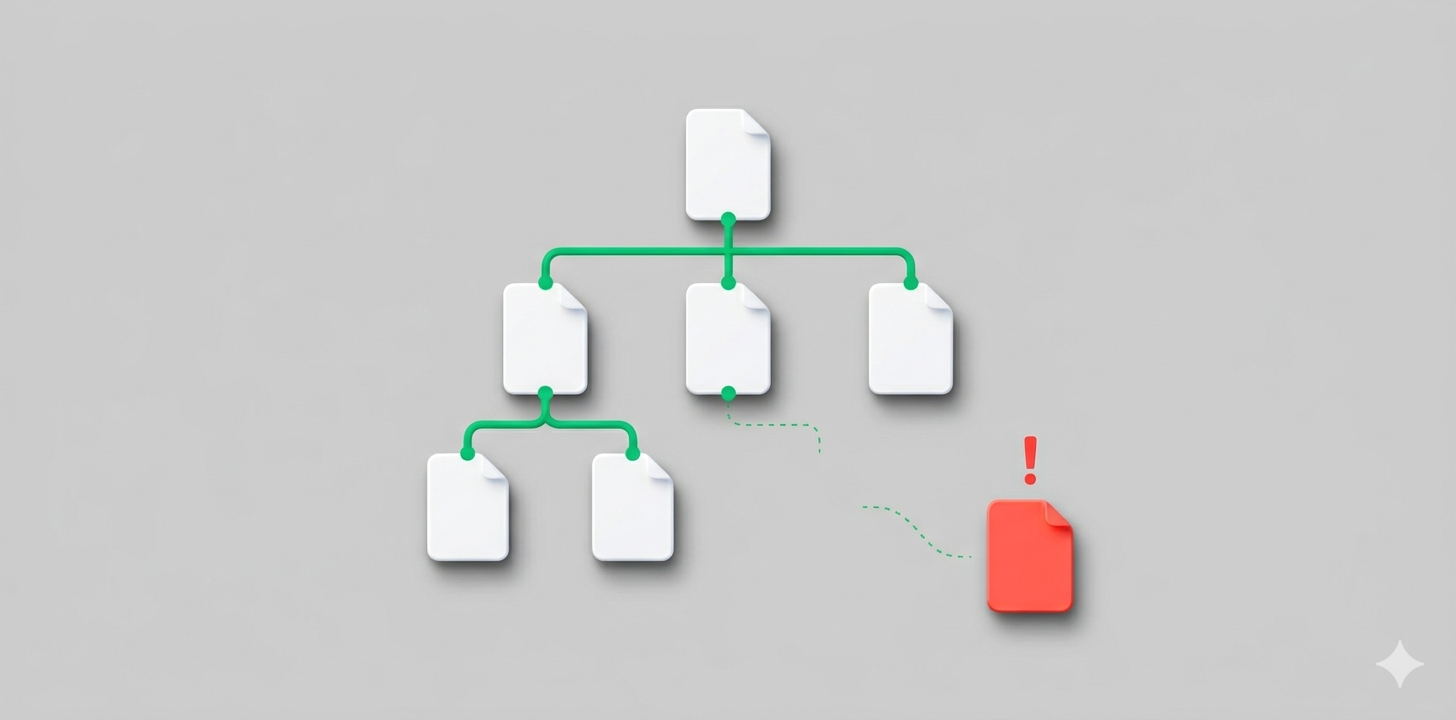
Orphan pages are pages on a website that no other section links to internally. Technically, they exist — they open via a direct URL, may be listed in sitemap.xml, and can even have external backlinks — but from the perspective of site structure, they are completely cut off from the rest of the content.
A search crawler finds pages by following links — moving from one section to another via internal links. If no link points to a page, the bot simply won’t reach it. That’s what an orphan page is: it technically exists, opens via a direct URL, but isn’t part of the site structure. Which means it’s not in search results either.
Orphan pages appear for various reasons and most often accumulate unnoticed:
- navigation changes or site restructuring that left old URLs disconnected from the menu;
- deleting categories without setting up redirects;
- CMS technical errors that automatically generate service or duplicate URLs;
- migration or redesign without checking internal linking;
- publishing new pages without connecting them to any section — especially common with promotional landing pages and temporary promo pages.
It’s important to distinguish between intentional and accidental isolation. A landing page deliberately disconnected from the rest of the site and blocked from indexing via noindex is perfectly normal practice. The problem arises when pages with valuable content or commercial queries end up isolated due to an error or oversight.
Why Orphan Pages Hurt SEO
Orphan pages aren’t just “dead weight” in the structure. They systematically undermine a site’s SEO performance in several ways at once.
Indexing Problems
A search crawler can only stumble upon a page with no internal links by chance. Even having the address in sitemap.xml doesn’t guarantee success: Google prioritizes pages accessible through the internal link network. Orphan pages can sit on a server for years without being indexed — generating zero organic traffic regardless of content quality.
Loss of Link Equity and Weakened Internal Linking
Every internal link passes a portion of authority from one page to another — that’s link equity. The more links pointing to a page, the higher its “value” in Google’s eyes. An orphan page receives none of this equity — it’s cut off from the entire site. Even if external backlinks point to it from other websites, that authority goes nowhere and simply “stagnates.” The result: the page doesn’t rank, and its potential authority is wasted.
Broken Site Structure
A site with many orphan pages resembles a library where some books have no catalog entry: they technically exist, but can’t be found. Search engines evaluate site architecture as a whole — and isolated URLs disrupt that picture. They blur the thematic hierarchy: Google doesn’t understand which section a page belongs to or how important it is relative to others. The more such URLs accumulate, the harder it becomes for the algorithm to set priorities — which pages to rank and which to ignore. In practice, this means even quality content may not rank simply because it’s structurally disconnected from the rest of the site.
Crawl Budget Waste
Googlebot doesn’t crawl a site indefinitely — every resource has a limit on how many pages the bot will visit in one session. That’s the crawl budget. Orphan pages consume this budget: the bot lands on an isolated URL, finds nothing useful for the structure, and wastes time that could have gone to important pages. For a small site, this isn’t critical. But for an online store with thousands of products or a news portal — every extra URL in the queue means new content may not get indexed on time.
How to Find and Evaluate Orphan Pages
Identifying orphan pages requires a combined approach — one tool isn’t enough.
Site Structure Analysis
The first step is running a crawler — a program that scans a site the same way a search bot does: following links and building a map of which pages are connected to which. The most popular tools are Screaming Frog SEO Spider and Netpeak Spider. Pages that aren’t on this map but exist on the site are potential orphans.
Comparing Crawl Data with Google Search Console
Finding orphan pages takes just three steps:
- Run a crawler and collect all URLs accessible via links on the site;
- Export the list of pages from the sitemap;
- Open Google Search Console and export the list of indexed URLs (section “Indexing” → “Pages”).
Pages that appear in GSC and the sitemap but weren’t found by the crawler are orphan pages. No internal links lead to them, so the bot reaches them only by chance. This is where most problems hide.
Checking Internal Links
An additional step is checking how many internal links point to each page. This can be done via Ahrefs, Semrush, or Netpeak Spider — they show this number for each URL individually. If a page has 0 or just 1 link pointing to it, it’s at risk. Found orphan pages should either be connected to the site structure via internal links or deleted — depending on whether they contain valuable content.
How to Fix Orphan Pages and Improve Site Indexing
After the audit, you have a list of problematic URLs. What to do next depends on the type of page and the quality of its content.
Analyzing and Classifying Orphan Pages: What to Do with Outdated and Valuable Content
Start by sorting the found URLs into three categories and creating a separate action plan for each.
- Current content. The material is fresh, the topic is relevant, and the page can potentially rank. Solution — add internal links from thematically related sections. These links must be contextually justified: mechanical “links for the sake of links” only dilutes the relevance of donor pages.
- Outdated or low-value content. The material has lost relevance or duplicates other content. Solution — delete it and return a 404, or set up a 301 redirect to the current version.
- Technical and service pages. For example, pagination pages (“/page/2”, “/page/3”), product filters, or site search results. Solution — block from indexing via noindex or canonical.
Optimizing Site Structure to Improve Internal Linking
To prevent orphan pages from appearing again, the site must have a clear hierarchy: home → sections → subsections → individual pages. Each level should be connected to the next via internal links — so the search crawler can always find its way to any URL.
What to check:
- Whether all key sections are present in the main menu and footer;
- Whether every new page receives at least one link from a relevant section before publishing;
- Whether you run the crawler after every structural update — redesign, migration, section deletion.
Technical Solutions
Alongside internal linking, there are technical steps that speed up the fix:
- Update sitemap.xml — it should only contain active URLs with a 200 status. Pages with 301, 404, or noindex codes in the sitemap are a direct reason why the bot wastes crawl budget;
- Set up 301 redirects for deleted or renamed pages — this preserves link equity and prevents traffic loss from old URLs;
- Use “URL Inspection” in Google Search Console to manually request indexing of important pages after adding links;
- For large sites, include a linking audit in the regular technical checklist — especially after every CMS update, redesign, or addition of new sections. A one-time check doesn’t protect against new orphans appearing in the future.
What to Do with Orphan Pages
There’s no single solution for all isolated URLs — the strategy depends on what the page is and whether it contains valuable content. Before acting, each found orphan page must be evaluated individually. Here’s the basic algorithm:
- Keep and integrate. If the page contains valuable content, receives direct traffic, or has external backlinks — add internal links from thematically related sections and make sure it’s included in the sitemap.
- Update and include in the structure. If the content is outdated but the topic remains relevant — update the material and connect the page to relevant sections via internal linking.
- Merge with another page. If there’s duplicate or similar content — set up a 301 redirect to the main page and move all valuable elements there.
- Block from indexing. For pages needed technically or for paid traffic but that shouldn’t rank in organic search — add the noindex attribute.
- Delete. If the content has lost all value — return a 404 or 410 code and remove the URL from the sitemap.
💡 The main rule: don’t ignore orphan pages just because they “aren’t causing problems.” They are — just quietly, gradually dragging down the effectiveness of the entire site.
SILO Structure — An Effective Way to Combat Orphan Pages
SILO is a site organization principle where all content is grouped into thematic clusters. Each cluster has a main (pillar) page and related subpages connected by logical internal linking. This approach helps prevent orphan pages from appearing at the architecture level, while also strengthening the site’s thematic authority in the eyes of search engines.
What does this look like in practice? Imagine an SEO agency website. One cluster — “SEO promotion” with a pillar page and subpages “Technical SEO,” “On-page optimization,” “Link building.” Another cluster — “PPC advertising” with subpages for Google Ads, Facebook Ads, and remarketing. The blog is divided into thematic groups aligned with these same clusters.
Every new article or page is immediately placed in a specific cluster and receives links from the pillar page and related materials. The mechanism for orphan pages appearing is eliminated at the publishing process level — a new page simply can’t appear “nowhere,” because it immediately has its place in the hierarchy.
Benefits of SILO for SEO:
- Even distribution of link equity within the cluster and between related sections;
- Faster indexing of new pages — the search crawler finds them through connections within the cluster;
- A clear thematic hierarchy that’s understandable to both users and search algorithms;
- Lower risk of keyword cannibalization between similar materials thanks to clear topic separation.
💡 Important note: SILO structure effectively prevents new orphan pages from appearing, but doesn’t solve the problem of those already on the site. So the right sequence is: first a full technical audit and fixing existing issues — and only then implementing the systematic architecture.
How Atlant Digital Finds Orphan Pages
Most site owners discover orphan pages by accident — when traffic has already dropped or an audit has revealed hundreds of URLs outside the structure. We find them before they have a chance to cause damage.
In every project, we follow the same algorithm:
- Crawling the site and building a complete map of internal connections.
- Comparing results with Google Search Console data — to identify pages Google knows about but the site structure ignores.
- Checking Google Analytics — sometimes an orphan receives direct traffic, which immediately raises its priority for integration.
- Classifying each found page: current, outdated, or technical — with a specific action plan for each.
- Re-crawling after fixes — to confirm that no important page has been left outside the structure.
What you get isn’t just a list of problems, but a clear action plan with priorities — what to fix first, what to delete, and what to integrate into the structure. If you’d like to audit your site, leave a request and we’ll prepare a detailed report.