


How much does it cost to create a website today in 2025
In 2025, creating a website in Ukraine is becoming more affordable thanks to tools like AI and low-code platforms — yet the price range remains wide, from a few hundred dollars for a basic project to tens of thousands for a complex one. It all depends on whether you’re a CMO planning a budget for a corporate portal or an entrepreneur launching your first service website.
Average benchmarks: simple, template-based solutions are cheaper, while custom websites with integrations require more resources. The main point isn’t the price itself, but how effectively the site solves your business goals — for example, increasing conversions or automating processes.
So, how much does it cost to create a website? The answer depends on several factors, which we’ll explore next, helping you plan your investment with ROI in mind.
What does the price of a website depend on?
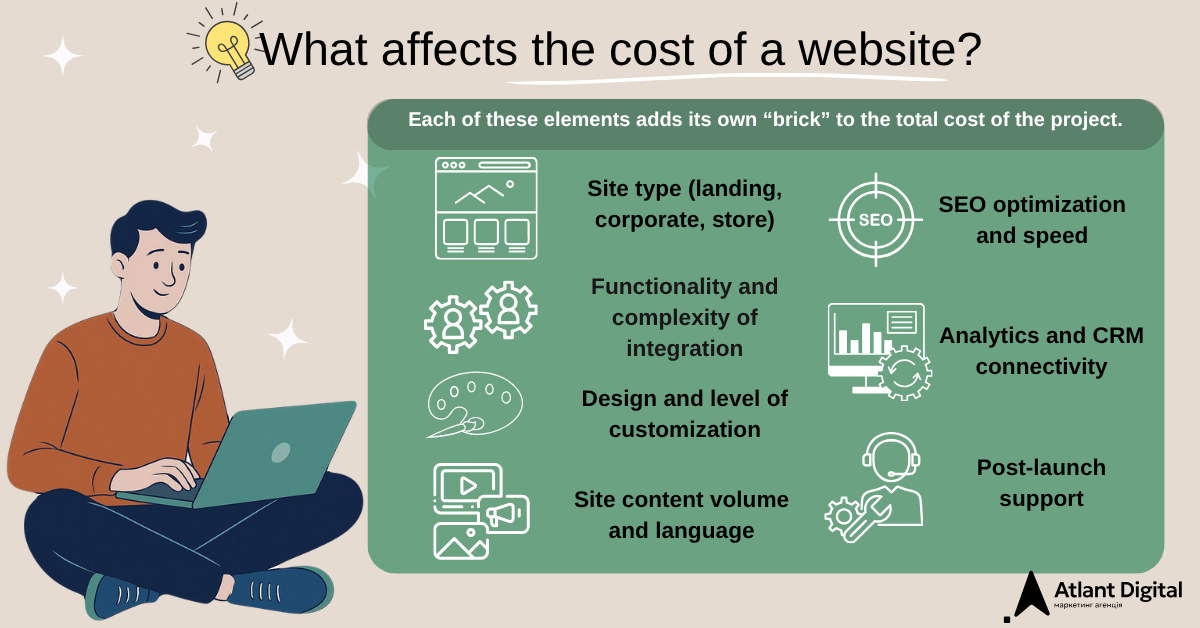
If you’re just starting to explore the topic of website creation, it’s no surprise that such a wide price range might be confusing. In reality, the cost is built like a constructor — each element adds its own “brick” to the budget depending on your needs. The key is to understand that while a cheap option might work for testing, for a real business, investing in a high-quality website pays off through client acquisition and process automation.
Below, we’ll break down the key factors — starting with the type of website — and explain why they affect the overall price. This will help you decide whether to do everything yourself (for example, using free website builders) or hire professionals for a reliable result.
Site type (corporate, store, landing, portal)
The type of website is the foundation that determines how many resources will be needed for development. Each type has its own purpose, level of complexity, and feature set — all of which directly affect the team’s workload, code volume, and testing time. If you’re planning to create an inexpensive website yourself, simpler types will work best for builders like Wix or Tilda. However, for an ambitious business, it’s better to invest in professional development — structural mistakes can cost you lost clients.
Below are the main types of websites with explanations, approximate prices (in USD, based on the Ukrainian market in 2025), and estimated development timelines (depending on complexity):
- Landing page (single-page site): This is a compact page designed to quickly attract attention and conversion — for example, collecting applications for a service or selling a single product.
Development complexity — low: usually one page with text blocks, forms, and calls to action, without complex navigation.
Approximate cost: $500–3000 (cheaper with templates, more expensive with a unique design).
Timeline: 1–2 weeks.
Why it affects the price: development is fast, but if you add a unique design or integrations (like lead forms), it requires more time for conversion optimization. For beginners, it’s an ideal start — you can do it cheaply, but a professional landing page pays off faster due to higher efficiency.
- Corporate website: an online representation of a company that features information about its services, team, contacts, and news. Its main purpose is to build customer trust and present the brand (company).
Development complexity — medium: 5–20 pages with a basic structure, optional blog, and contact forms.
Approximate cost: $2000–10,000 (a basic CMS version is cheaper, while one with integrations costs more).
Timeline: 2–4 weeks.
Why it affects the price: a larger number of pages requires logical navigation, content management through a CMS (like WordPress), and mobile responsiveness. If you build it yourself, expenses are minimal, but without expertise, the site may look generic and fail to inspire trust. A professional version costs more due to its focus on branding.
- Online store: a platform for e-commerce that includes a product catalog, search, shopping cart, and order processing system. Its main purpose is to automate sales, allowing customers to shop 24/7.
Development complexity — high: includes payment processing, product filters, and user accounts.
Approximate cost: $5000–30,000. Websites built on ready-made platforms like WooCommerce are cheaper to develop, while custom-built solutions — created specifically for a business’s needs — are more expensive.
Timeline: 1–3 months.
Why it affects the price: a reliable system for transaction security, database integration, and load testing is required. With website builders like Shopify, you can launch a budget-friendly basic version, but for a large product range, custom code is needed — which increases development and plugin costs.
- Portal: a large-scale platform designed for a wide audience, featuring forums, user accounts, and extensive data sets (for example, a news or educational resource). Its purpose is to enable user interaction, information exchange, and service delivery.
Development complexity — maximum: requires a powerful backend to handle requests and ensure scalability.
Approximate cost: $10,000–50,000+ (depending on functionality and integrations).
Timeline: 2–6 months.
Why it affects the price: many features, such as user registration or content moderation, require complex architecture, data protection, and ongoing maintenance. It’s almost impossible to handle this independently without technical skills, so it’s best to entrust such projects to professionals — the investment pays off through user loyalty and long-term engagement.
Choosing the right type of website depends on your goals: for testing, a landing page works best; for growth — an online store or a full-scale portal. The key is not to cut corners on the fundamentals, as redesigning later will cost much more.
Functional complexity and design
Functionality and design are the “heart” of a website — they determine how user-friendly and effective it is. If you’re considering a more budget-friendly option, the basic functionality of template-based websites may seem appealing. However, for businesses, a more advanced approach pays off better, as it improves user experience and boosts conversions. The more complex the website, the higher the cost — since the workload for developers and designers increases. A simple website can be built quickly, while a complex one requires months of planning and multi-stage implementation.
Functionality includes everything that makes a website “alive”: from basic elements (forms, galleries) to advanced ones (chatbots, personalized recommendations). Complex features require a well-thought-out backend (server-side logic), frontend (user interface), and thorough testing for errors. For example, with CMS platforms like WordPress, basic functionality is inexpensive thanks to pre-built plugins, but custom features (such as API integrations) add costs for development and security.
Design is not just about visuals — it’s primarily about user experience (UI/UX): how the website looks and how users interact with it.
Template design is cheaper, as it’s based on pre-made solutions. Custom design involves creating wireframes, ensuring mobile responsiveness, and conducting user testing. Expert-level design builds trust — for instance, through thoughtful animations that capture attention — but requires creativity and several design iterations.
Website builders can help you create a site on your own, but without professional input, you risk losing potential clients due to poor usability or inconsistent structure. That’s why quality development requires greater investment, but the results always justify the cost.
Site content volume and language
Content volume refers to the amount of text, images, videos, and pages that need to be placed on the website. If you’re building the site yourself, a smaller amount of content makes the process easier, but for a business with a large product range, it can become a real challenge.
The price increases with the amount of material that requires extra optimization (for example, page load speed), management through a CMS, and SEO configuration for search engines. A website with five pages requires much less investment than one with over fifty, as the content volume and structure demand additional work.
Multilingual functionality involves creating versions of the website in different languages (for example, Ukrainian and English). Its main goal is to expand the audience, but the challenge lies in translation, interface adaptation, and SEO optimization for each language separately. This means duplicating content, proofreading for errors, and integrating language-switching tools. If you’re on a budget, website builders with plugins can help; if you’re aiming for a professional result, it becomes an investment in your business’s international growth.
Additional integrations (CRM, analytics, payment systems)
Integrations are connections between your website and other services that transform it from a simple page into a fully functional business tool. Without them, a website is just a page — but with them, it becomes an automated system. Each integration requires API configuration, testing, and security checks — and that’s exactly what impacts the final development cost.
- CRM (for example, Bitrix or AmoCRM):
They automate client interactions: capturing leads, storing contacts, and sending emails. Such integration requires synchronization with website forms and the protection of personal data, which takes more time — and therefore requires a higher investment.
- Analytics (Google Analytics):
It allows you to track visitors and their behavior, helping you understand which pages or ads perform best. A basic setup costs little, but creating custom events, reports, and dashboards increases the complexity — and, accordingly, the cost.
- Payment systems (LiqPay, Stripe):
They enable online payments — a critical component for e-commerce. The setup requires transaction testing, SSL installation, and compatibility checks, all of which impact the project’s budget.
If you’re building the site yourself, you can use ready-made plugins, but for reliability, it’s better to involve professionals — this helps prevent data issues and ensures secure payment processing.
Stages of website creation and their cost
Website development is a structured process, much like building a house — from laying the foundation to the finishing touches, where each step impacts the overall budget and final result. For business owners and marketers, it’s an opportunity to control expenses by understanding where resources go. If you’re looking for ways to save — for example, by using website builders — you can handle the simpler stages yourself. However, for more complex projects, it’s best to involve professionals to ensure quality and stability.
Below, we’ll break down the key stages of website creation — their purpose, impact on cost, and approximate prices for the Ukrainian market in 2025 (in USD). Overall, the process takes from two weeks for basic websites to three to six months for large-scale projects.
1. Analysis and technical specifications
The project analysis stage begins with studying your business goals, target audience, competitors, and functional requirements. Based on this, a technical specification (TS) is created — a detailed plan describing the structure, design, and necessary integrations. Without a clear TS, the project risks delays due to constant revisions and misunderstandings between the team and the client.
If you’re a startup founder looking to save money, you can use online templates to create a TS. However, a professional analysis helps avoid critical mistakes right from the start.
Estimated cost: $200–800, depending on the depth of analysis — basic projects are closer to the lower range, while complex ones that include market research cost more.
Timeline: 3–7 days.
At this stage, specialists conduct interviews, competitor analysis, and develop the site structure. A well-prepared technical specification is an investment in precision and budget efficiency, as it can reduce further costs by 20–30%.
2. Design (UI/UX)
Design covers the creation of visuals and user experience — from wireframes to final layouts — taking into account branding, mobile responsiveness, and navigation convenience. UI focuses on appearance (colors, buttons), while UX focuses on logic — helping visitors quickly find what they need. Template-based design on platforms like Tilda is cheaper, but a custom design increases conversion rates by making the website more appealing and intuitive for users. For beginner entrepreneurs, website builders can simplify this stage, but without a designer’s involvement, the site may look unprofessional and lose user trust.
Estimated cost: $600–2500. Template-based solutions are more affordable, while custom layouts with user testing are more expensive.
Timeline: 7–20 days.
The price depends on creativity, the number of iterations, and work in professional tools like Figma. For marketers, this stage isn’t just about aesthetics — it’s an investment in brand recognition and trust, directly influencing client acquisition.
3. Development (front-end and back-end)
Development transforms the design into working code: Front-end is the interface users see (HTML/CSS/JavaScript, often with frameworks like React), while Back-end handles the server logic (databases, form processing — for example, on Laravel).
CMS platforms like WordPress are well-suited for basic websites — they simplify the process using plugins that add necessary functions. However, if you’re building an online store, custom code ensures higher payment security and greater system stability. Website builders can work without programming, but unique features still require developer involvement.
Estimated cost: $2300–9000, depending on project complexity. Typically, Front-end costs $800–3000, and Back-end $1500–6000.
Timeline: 10–40 days.
The more complex the functionality, the more time is needed for coding, testing, and speed optimization. This stage lays the technical foundation for scaling your business and ensuring the website performs reliably under heavy load.
4. Testing and launch
Testing checks the website for errors: functionality, browser and device compatibility, loading speed, and security. After that comes the launch phase — uploading the site to hosting, connecting the domain, and configuring the SSL certificate. Without these steps, the site may work inconsistently and lose user trust. If you’re building the site yourself, tools like BrowserStack can help with basic testing, but only professional QA can detect hidden issues before the launch.
Estimated cost: $300–1000. Testing usually costs $200–500, and launch setup with domain and SSL — $100–500.
Timeline: 3–10 days.
The price depends on a mix of automated and manual testing, especially under load for e-commerce projects. This stage ensures the website runs smoothly and reliably from day one, minimizing the risk of post-launch failures.
5. Post-publication support
Maintenance keeps the website alive after launch — updating plugins, fixing technical bugs, adding new content, and monitoring performance. A turnkey website package usually includes 1–3 months of free support, after which a subscription model applies. For new businesses, this is especially important since the website evolves alongside the company and requires regular updates. If you manage the site yourself on a CMS, changes must be made manually — but without experts, even a small error can affect the site’s stability.
Estimated cost: $50–500 per month, or $25–100 per hour.
Timeline: Ongoing.
The cost depends on the scope of work — system updates, backups, SEO, or monitoring. Regular maintenance helps avoid downtime and data loss, ensuring stable performance and continuous growth in efficiency.
Hidden or additional costs
Many people planning to build a website focus only on the core development, forgetting about the additional elements that influence the total budget and long-term stability of the project. These costs often hide in the details — but without them, the site either won’t launch or won’t function properly. Understanding these nuances helps avoid unexpected expenses, especially if you’re budgeting for the year ahead.
Below, we’ll review the key components, explain why they matter, and provide approximate prices for the Ukrainian market in 2025 (USD) — including the expected increase in domain and hosting fees. This will help you understand where you can save money and where it’s smarter to rely on professionals.
Domain, hosting, SSL
Domain — this is the website’s address on the Internet (for example, example.com.ua), hosting — the server where files are stored, SSL — a certificate for data encryption (HTTPS, so that the site looks secure). Without an SSL certificate, the site may be unavailable or cause user distrust — browsers mark such resources as unsafe. If you create a website yourself, builders often include basic hosting, but for business, you need a reliable option with backups. The cost of creating a website increases due to annual renewals, but this is the foundation of online presence.
The cost of basic tools for launching a website can vary widely: domain — from $10 to $70 per year (for example, .com.ua costs about $14, and .ua — up to $70 with a possible increase in tariffs in 2025), hosting — from $5 to $100 per month (for small websites, shared hosting is suitable, for stores — VPS), SSL certificate — from $0 to $100 per year (from free Let’s Encrypt to premium solutions).
You can independently choose how much to invest at this stage, but it is important to remember: the quality of hosting and protection directly affects speed, security, and SEO performance. Sometimes slightly higher costs mean stable website operation without failures and loss of clients.
CMS or custom development
CMS (Content Management System, such as WordPress or Joomla) — is a ready-made platform that allows easy website editing without coding. Custom development — is unique code created specifically for your needs, without the limitations of templates. CMS is cheaper for small businesses because it uses plugins (ready-made modules for various functions) but can be vulnerable to hacks if not regularly updated. Custom development suits complex projects — for example, portals or systems with a large number of features. It provides flexibility but requires more time to implement.
If you are a CMO and want to save money, it’s worth starting with a CMS solution, but as your business grows, custom development pays off thanks to better scalability and stability.
The development cost depends on the chosen approach. CMS-based websites typically cost between $1000 and $5000 — they are cheaper due to ready-made templates and plugins. Custom development starts at $5000 and can reach $50,000+ for large systems, while corporate ERP solutions can even exceed $200,000.
Timeline: a CMS can be implemented within a few weeks, while custom solutions take several months. You can choose how flexible the system should be: a CMS saves 20–40% of the budget thanks to pre-built tools, while custom development offers uniqueness, security, and scalability, but requires an experienced development team.
SEO optimization and content
SEO optimization — is the process of adjusting a website for better visibility in search engines (Google). It includes keywords, loading speed, and meta tags. Content refers to the texts, photos, and videos that fill the site and attract visitors. Without SEO, the site remains “invisible”, while poor-quality content repels users. If you are an online store owner, basic SEO can be set up independently using tools like Google Search Console, but professional optimization with copywriting ensures stable traffic and increased sales. Investments in SEO gradually pay off by increasing the number of clients.
The cost of SEO and content depends on the scope of work and the website’s size. SEO optimization can cost from $300 to $10,000 per month: basic setup — around $100–1200 per project, while full-scale promotion starts from $300/month. Content creation is priced at $4–8 per 1000 characters, so website filling usually costs $200–2000.
Timeline: first results appear within 1–3 months.
You can decide on the level of investment — from basic optimization to a comprehensive strategy. However, it’s important to remember that high-quality SEO and well-planned content provide long-term traffic and a stable ROI, especially for large websites with dozens of pages.
Site maintenance after launch
Website maintenance — is regular updates, backups, bug fixes, security monitoring, and adding new features. After launch, a website requires attention just like a car: without care, malfunctions or hacker attacks can lead to losses. For new businesses, basic maintenance can be done independently — for example, updating the CMS. However, for companies with traffic and sales, it’s better to choose a subscription-based maintenance plan: the expenses continue, but they ensure the website’s uninterrupted operation.
The cost of technical maintenance ranges from $50 to $500 per month, or $25–100 per hour if billed hourly. For large websites, annual packages can reach $4500. Timeline — ongoing. The amount depends on the scope of tasks: basic backups, plugin updates, SEO support, or security monitoring. You can choose your desired service level, but it’s important to remember — regular maintenance prevents downtime, technical failures, and revenue loss, ensuring stable long-term website performance.
How much does a website cost for different budgets
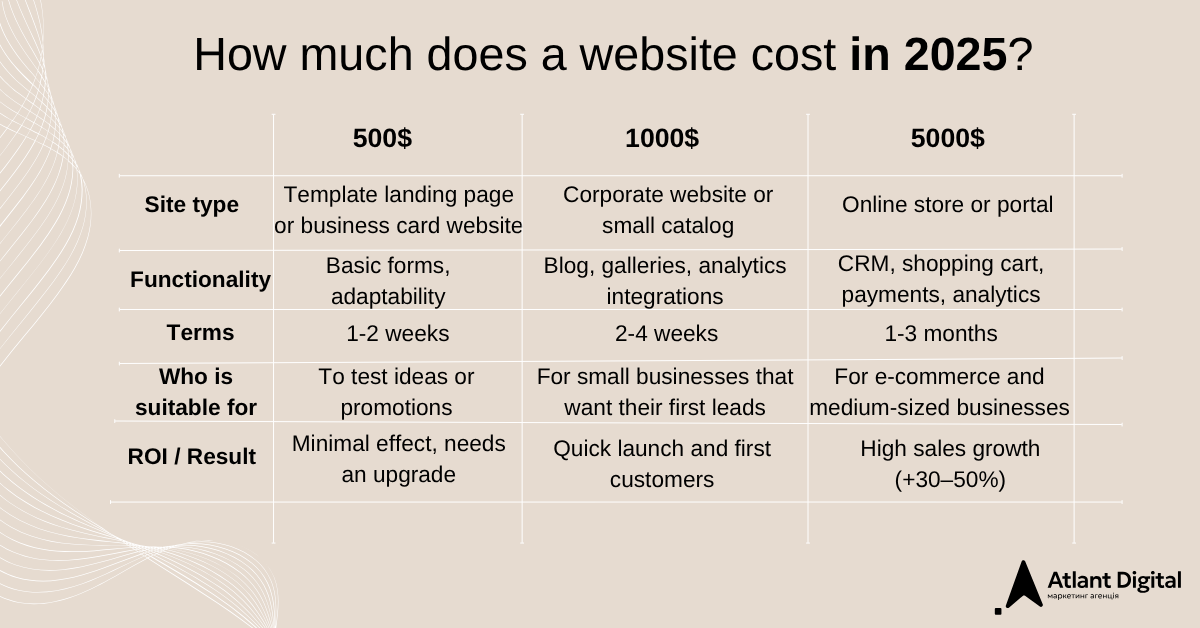
A website budget is not just a number — it’s an investment in a tool that helps your business attract clients, automate processes, and expand into new markets. You probably want to understand what you can actually get for different amounts — without overpaying. In 2025, prices on the Ukrainian market vary depending on the type of website, the developer (freelancer or studio), and the level of customization. Below, we’ll compare what you can expect for $500, $1000, and $5000+, based on current market data (for example, from studios like Wezom, Barbarys, and Web24).
Remember: a low-cost option is suitable for testing, but for growth, it’s better to invest in quality — because ROI pays off within 3–12 months through increased traffic and sales. How much does a website cost? It depends on your goals — from a basic template to a full-scale platform.
For $500: a basic start to test an idea
For this budget, you can create a simple template-based website — an ideal option for testing a niche or making your first step online. Usually, it’s a landing page or a business card site with up to five pages, built on website builders like Tilda or Wix, or on a basic CMS such as WordPress with ready-made plugins.
This amount typically includes a mobile-responsive design, contact forms, minimal content (texts and photos), a domain, and hosting for one year. The functionality is limited — no complex integrations or unique design — but it’s sufficient for a start.
Timeline: 1–2 weeks.
Why such a price? The main savings come from using templates and minimal customization. It’s a quick solution without deep analysis, UX testing, or SEO. Such a site is perfect for short-term promo campaigns or service presentations, but for scaling and future sales, an upgrade will be necessary.
For $1000: a practical website for small businesses
With this budget, you can move from a test page to a fully functional website that actually attracts clients. Typically, this is a corporate website or a small catalog with 5–10 pages, built on a CMS such as WordPress or OpenCart, using a paid template.
The project includes a unique design (with prototype and mobile adaptation), basic functionality (blog, gallery, contact forms, Google Analytics integration), initial SEO setup, and content filling.
Timeline: 2–4 weeks.
Why is it more expensive? At this level, the process includes technical specification analysis, thoughtful structure, front-end development, and testing, ensuring stability and user comfort. This is an optimal solution for service-based businesses or companies with a small product range that don’t require online payments.
For example, a corporate website developed by a studio for $800–1000 allows clients to edit content independently. Such an investment pays off quickly thanks to the first leads and a fast online launch — without the need for large-scale spending at the start.
For $5000+: a complete platform for growth
In this range, we’re no longer talking about just a website, but a full-fledged business platform that automates sales and supports scaling. This can be an online store, a corporate portal, or a complex catalog with CRM and payment integrations, built either on a CMS (such as Bitrix or WooCommerce) or entirely on custom code.
The project includes: in-depth analysis and technical specification, unique UI/UX design with user testing, and a complete feature set — shopping cart, online payments (e.g. LiqPay), CRM integration, personal accounts, and analytics. It also covers optimized content, SEO setup, and 1–3 months of post-launch support.
Timeline: 1–3 months.
Why such a price? The development requires coordinated work of designers, developers, analysts, and testers. The project needs a complex backend, thorough security testing, and preparation for scaling.
Best for: medium-sized businesses and e-commerce companies with large product assortments.
Example: an online store for $5000–10,000 with automated order processing or a corporate portal from $10,000. Such investments are fully justified — a turnkey website can increase sales by 30–50%, providing long-term profit and a competitive edge.
How to order a website and not overpay
When it comes to choosing a developer, it’s important not only to compare prices but also to understand what exactly you’re paying for. In the web development market, the difference between “cheap” and “affordable” can be huge: in the first case, you get a website that technically works but doesn’t deliver results; in the second, you get a tool that truly pays for itself.
1. Define goals and prepare terms of reference
Before you start looking for a developer, define why you need a website — to sell, inform, generate leads, or automate processes. This determines the type of website, its structure, and functionality — and therefore, the overall cost.
A technical specification (TS) is your protection against misunderstandings. It clearly outlines all blocks, pages, integrations, languages, deadlines, and expected results. If a developer doesn’t suggest creating a TS — that’s a red flag. Without it, it’s impossible to accurately estimate the budget, and mid-project changes will always cost more.
💡 Tip: even if you’re not a technical expert, you can use ready-made TS templates or briefly describe your business goals. A good developer will help you turn that into a detailed, structured document tailored to your project.
2. Choose a contractor based on their approach, not their price
The cheapest offer rarely means the best deal. Ask for a portfolio and focus on quality, not quantity: check whether the websites are responsive, how the details look, and how quickly they load.
Communication and reporting are just as important — a good developer explains each stage in simple terms, doesn’t avoid questions about deadlines, and clearly documents agreements in the contract. If someone promises “everything will be done in a week” without describing the process — that’s a warning sign.
💡 Tip: pay attention to agencies experienced in your specific niche — such as e-commerce, services, or real estate. They better understand the business logic and immediately offer solutions that generate profit, not just “a pretty website.”
3. Check the estimate
The estimate is another document worth reviewing carefully. It should clearly break down all stages — analysis, design, layout, development, testing, and support. If the price is listed as a single total without any breakdown, there’s a risk that “hidden” costs will appear later in the process.
Ask for an explanation of each item and clarify what’s included in the final price — domain, hosting, SEO, or technical support. A transparent estimate helps you understand the real cost of the website and avoid overpaying.
💡 Tip: a good developer isn’t afraid to show their pricing logic — it’s a sign of experience and honesty.
Want to avoid all these risks and get a website that truly drives your business? Contact Atlant.Digital — we build websites with a focus on ROI, analytics, and measurable results, not just design.
2025 trends in web development
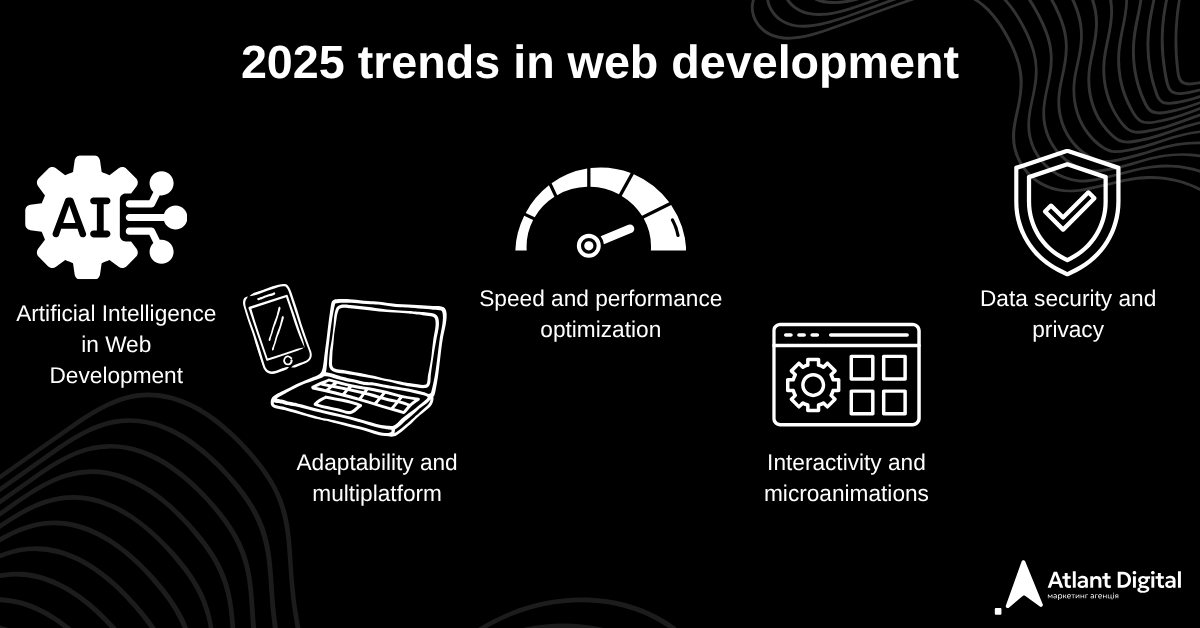
In 2025, website development is no longer just about design or coding. The market is shifting toward smart, fast, and personalized solutions, where a website becomes a powerful client acquisition tool, not just an online business card. New technologies make the development process easier — but at the same time, they raise the bar for quality, and that’s exactly what influences the final cost.
1. Artificial Intelligence in Web Development
AI is no longer a trend — it’s a standard. It’s now used for content creation, user behavior analytics, chatbots, and even design generation. For instance, AI can automatically optimize images, generate SEO texts, or personalize content for each visitor.
💡 How it affects cost: basic AI integrations are becoming cheaper (AI tools are now available even in Tilda or Webflow), but advanced machine-learning systems — like recommendation engines or AI-driven analytics — can add 10–30% to the budget due to their configuration complexity.
2. Adaptability and multiplatform
Users now switch seamlessly between phones, laptops, and tablets without losing convenience — which makes responsive design no longer optional but essential. In 2025, another layer is added: adapting websites to different content formats, including video, interactive elements, and AR.
💡 How it affects cost: responsive design across all devices increases the time required for designers and testers. While basic responsiveness is usually included in the standard price, multimedia adaptation (video, 3D, AR) can raise the total cost by 15–40%.
3. Speed and performance optimization
In 2025, Google continues to prioritize Core Web Vitals — loading speed directly affects both SEO rankings and conversion rates. Users won’t wait longer than three seconds, which makes image, code, and cache optimization absolutely critical.
💡 How it affects cost: fast websites require greater technical precision — from server optimization to micro-animations and performance tuning. This can add 10–20% to the total budget, but it pays off through higher search rankings and lower bounce rates.
4. Interactivity and microanimations
In 2025, users will be engaged not with text, but with emotional interaction: movement, animations, transitions, hover effects. This is not just beauty, but part of UX – it helps the user intuitively understand where to click and what to expect.
💡 How does this affect the cost: basic effects are included as standard, but complex interactive scenarios (parallax, 3D animations, interactive catalogs) require separate development, increasing the budget by 20–50%.
5. Data security and privacy
With the growth of online transactions, security has become one of the main criteria for choosing a contractor. Sites integrate SSL certificates, bot protection, two-factor authentication, and in large projects even server-side tracking.
💡 How it affects the cost: Basic security is already included in the CMS, but custom protection (for e-commerce or SaaS) requires separate development and increases the budget by 5–15%.
The trends of 2025 are making websites smarter, faster, and closer to the user, but also raising the bar for quality. A modern website is no longer an expense, but an investment in automation, analytics, and profitability. To avoid overpaying, it’s worth immediately understanding how much it costs to buy a website with the necessary features, not just “something basic.”
Conclusion: is it worth investing in a website?
In 2025, a website is no longer just an “online business card” — it’s the central hub of your business, where marketing, sales, and analytics converge. Building it isn’t an expense — it’s an investment in trust, automation, and sustainable growth.
You should invest in a website when you:
-
plan to grow your brand and want clients to take your company seriously;
-
need control over lead flow without depending on social media or marketplaces;
-
want to cut ad costs through analytics, SEO, and conversion optimization;
-
aim to scale your business and make processes automated.
A quality website is an asset that works 24/7 — it takes orders, builds trust, collects data, and supports better business decisions. Such investments pay off within months, especially when development is focused on ROI, not just visuals.
If you need a website that actually sells — not just exists — Atlant.Digital will help you build a system that combines marketing, design, and analytics into one solution — and finally answers the question: how much does it really cost to build a website?
FAQ — Frequently Asked Questions
Yes, you can — with the help of builders like Tilda, Wix, or WordPress.com. But free versions have limitations: platform advertising, weak optimization, lack of SEO and analytics. For businesses, it’s better to invest in your own domain and hosting.
The price depends on the type (landing, corporate, store), the volume of pages, design and integrations. Average formula: (number of pages × complexity × working hours). Approximate: from $500 for a basic site to $10,000+ for a custom solution.
In 2025, the cost of development by a specialist or agency will start from $800–1000 for a corporate website and can reach $5000+ for a complex store or portal. You pay not only for the design, but also for the strategic approach, analytics, and technical quality.